AI Governance for Contractors: A Field Guide
 12 min
Count the AI your company already uses. Estimators paste scopes into ChatGPT. A project manager built an assistant that drafts RFI responses. IT switched on Copilot with Microsoft 365. Your project management software added an AI assistant in its last release, and a vendor wants to pilot an agent that files submittals. Each decision made sense on its own. Together they leave a question nobody has answered: which AI results the company stands behind, and who is accountable when one is wrong.
This guide is written from the contractor's side of the table, for operations and VDC leaders, IT, and the executive who sponsors AI. It applies to every AI tool you use, from any vendor.
AI governance is how a company decides which AI results it relies on and who stands behind each one. For a contractor it comes down to five decisions: who owns AI overall, which uses need one company answer, who owns each shared tool, what AI may do without a person's approval, and how you hold AI vendors to account. Keep the rules light where the risk is low, so people don't route around them.
Why AI governance matters more every year
AI has moved from answering questions to doing work. A wrong chat answer costs one person a few minutes. An agent that sends the wrong submittal to a general contractor costs the company money and standing with that GC.
Three shifts are behind this:
- From answers to actions. Agents now write into project systems, send email and update logs.
- From one tool to many. AI arrives inside software you already pay for, often switched on in a routine release.
- From specialists to everyone. Anyone can build an assistant in an afternoon. That openness is how adoption takes hold, and it is also how one job ends up done five different ways.
These are the usual signs that a company needs a governance model:
- Several assistants do the same job, each tuned a little differently.
- Nobody can list which AI tools touch company or project data.
- The company has a standard tool for a workflow, and most of that work still happens in open chat.
- A tool a team depends on has no named owner.
- Security questions about AI arrive one at a time, with no single person to answer them.
What AI governance is for
Governance decides what the company can rely on. Contractors already work this way with submittals: anyone can prepare one, and a named person reviews it before it goes out. AI needs the same line between drafting and signing.
It works the way a safety program does. A safety program has an owner, rules scaled to the hazard, training by role and regular audits. AI governance needs the same parts, sized to how much the company depends on each result.
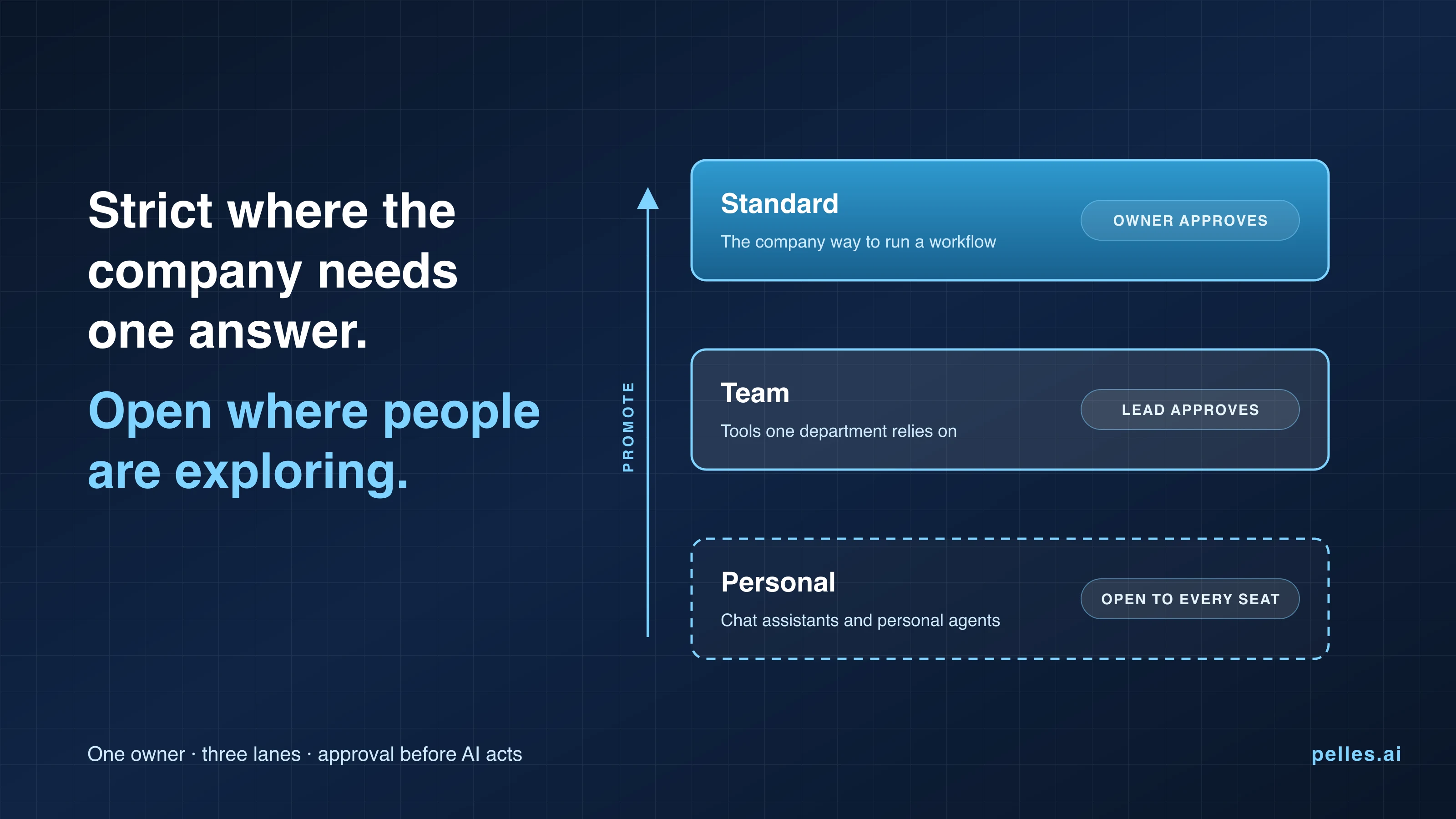
Heavy rules backfire. MIT Sloan's article on minimum viable governance describes how governance that is too heavy creates bottlenecks and drives people to unapproved AI tools. The aim is to stay open where people are exploring and strict where the company needs one answer.
Name one owner and a small steering group
One person should be accountable for AI across the company, with a small steering committee that sets direction.
- The operations systems owner runs governance day to day. At most trade contractors this person sits in operations or VDC, because the decisions are about workflows.
- IT owns the security review, seats and access.
- The steering committee brings together an executive sponsor and people from operations, VDC, IT and the field. It decides which workflows become company standards and reviews the AI register every quarter.
Put someone from the field on that committee. Procore's guide to construction technology adoption recommends a standing technology committee, careful choice of who pilots a new tool, and demand that grows from the field rather than being pushed from the top. If you haven't hired an operations systems owner yet, two people can share the role for a while. Name them, so the company knows who to ask.
Keep a register of every AI tool, app and agent
You can't govern AI you can't list. Keep one register, with a line for each AI tool, shared app and shared agent, including AI features inside software you already own.
| Column | What to record |
|---|---|
| Name and vendor | The tool, and the company that supplies it |
| Lane | Personal, Team or Standard |
| Owner | The one person who approves changes and answers for it |
| Users | Who has access |
| Data | Which company and project data it can read |
| What it can do | Answer, draft, or act in another system |
| Last review | The date someone last confirmed it is still needed |
A register of approved uses is also what AI management frameworks such as the NIST AI Risk Management Framework and ISO/IEC 42001 ask for. A spreadsheet is enough to start.
Sort every use of AI into three lanes
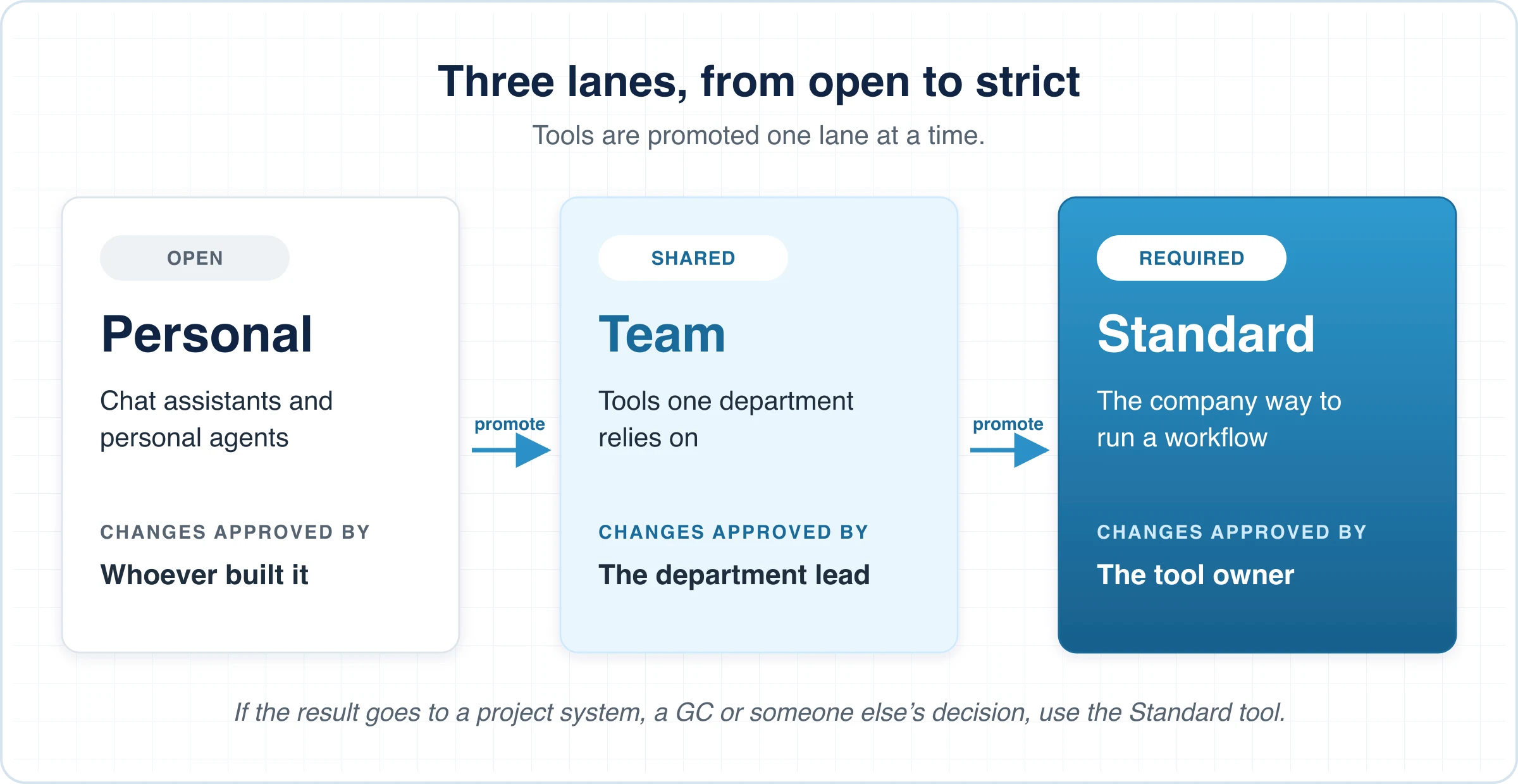
Different uses need different rules. Three lanes, Personal, Team and Standard, let you be strict where the company relies on one answer and open where people are still exploring.
| Lane | What belongs in it | Examples | Who approves changes | When it's reviewed |
|---|---|---|---|---|
| Personal | Chat assistants and agents people build for their own work | Drafting an email, summarizing a spec section, sorting your own inbox | The person who built it | When others start relying on it |
| Team | Tools one department relies on | A scheduling assistant, a field observation log, a subcontract review agent | The department lead | Quarterly |
| Standard | The company's way to run a workflow. Using the tool is required. | Project start-up checklist, bid review, submittal log check | The tool's owner, in step with the SOP it carries | With each SOP revision, and quarterly |
A tool moves from Personal to Team to Standard when an owner asks and the steering committee agrees. It is retired the same way.
Microsoft's Power Platform environment guidance makes the same split, separating personal productivity apps from solutions built for teams and for the whole organization.
Give staff one rule of thumb
Lanes only work if people know which one they're in. One sentence covers most cases:
If the result goes into a project system, to a general contractor or owner, or into a decision someone else relies on, use the Standard tool where one exists.
If you already have criteria for which projects go into Procore, reuse them: any project that qualifies runs the Standard AI tools too.
Give every shared tool one owner and a change process
Each shared app and agent needs one named owner who approves changes, answers questions about it and decides when to retire it. Builders propose changes, and the owner approves them.
- Pick the person whose workflow it runs. The VDC manager owns the project start-up tool; the purchasing lead owns the subcontract review agent.
- Test changes before they reach people. A change should be tried on a copy or a preview first, then approved, then released as a new version.
- Keep a history. When a result looks wrong, the owner should be able to see which version produced it.
- Merge duplicates. When two agents do the same job, keep the better instructions, retire the other one, and give the result one owner.
- Clean up every quarter. Confirm each owner and retire what nobody uses.
An owner and a lifecycle for every app is the basis of SaaS governance, and AI tools need it more, because their behavior changes with their instructions. If a platform can't hold changes for approval, the owner can still run the process by hand until it can.
Decide what AI may do without a person
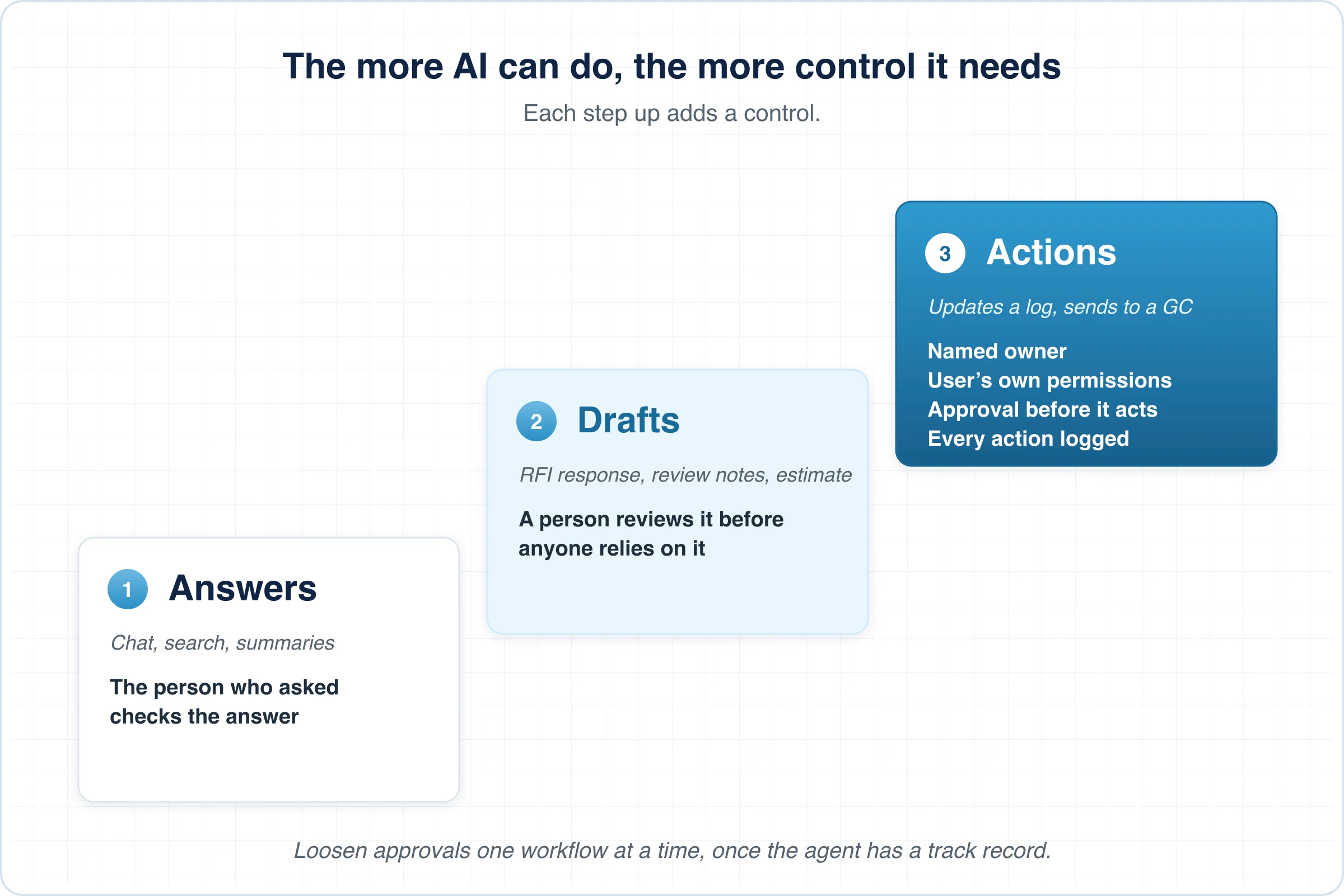
The more an AI tool can do, the more control it needs. Sort what each tool does into three levels and set the control to match.
| What the AI does | Examples | Control |
|---|---|---|
| Answers | Chat, search, summaries | The person who asked checks the answer |
| Drafts | An RFI response, submittal review notes, a first-pass estimate | A person reviews the draft before anyone relies on it |
| Acts | Updates a log in your project system, sends a document to a GC, files a form | A named owner, the user's own permissions, approval before anything external or irreversible, and a record of every action |
Four rules cover most agents:
- An agent acts with the permissions of the person it works for. A shared account with broad access lets an agent do things none of its users could.
- Anything that leaves the company or can't be undone waits for approval at first. That includes sending to a GC or owner and changing a record others rely on.
- Every action is recorded, with the agent, the person it acted for and what changed.
- Approvals loosen one workflow at a time, once the owner trusts the agent's track record on that workflow.
We wrote about agents moving from tools to workers in an earlier post. Governing what they may do alone is what lets a company give them more of the work.
Give AI the least access it needs
AI should see the data a role needs and nothing more. Most contractors already define access by role, for example with Procore permission templates. Reuse those roles for AI rather than building a second set.
- Prefer tools that work through each user's own login to your project systems, so AI can't reach data the person couldn't.
- Know where the data goes. For each tool in the register, record which data it reads, where it is stored and whether the vendor uses it to train models.
- Repeat the data review when a vendor changes its terms or you start using a tool for something new.
The questions to ask about data use are in Proceed with Caution.
Hold your AI vendors to account
Treat a key AI vendor the way you treat a key subcontractor: named people on both sides, regular meetings and a clear path for escalating problems. These are the core of supplier relationship management.
| Level | Your company | Your AI vendor | Meets | Covers |
|---|---|---|---|---|
| Strategic | Steering committee | Vendor leadership | Quarterly | Direction, roadmap, commercial terms |
| Operational | Operations systems owner | Customer success | Monthly | Access, usage, training, the scorecard |
| Working | Tool owners and builders | Solutions and support | Weekly while a tool is being changed | Changes, fixes, questions about releases |
Issues are settled at the lowest level that can decide them and move up one level when they can't. The quarterly meeting works best as an executive business review built on numbers both sides agreed in advance.
Questions to ask any AI vendor
- Who is our counterpart at each level of your company?
- Does the AI act under each user's own permissions in our other systems?
- Who can change a shared tool, and can we approve changes before they reach our people?
- Can we see each version and a history of changes?
- What can an agent do without a person's approval, and is every action logged?
- What happens to our data, and is it used to train models?
- How do we switch a feature off?
Review a short scorecard every month
Pick four or five measures, record a baseline before you start, and review them each month. Take the trend to the quarterly steering meeting.
| Measure | Why it matters |
|---|---|
| Shared tools with a named owner | Tools without an owner drift |
| Duplicate shared agents | Each duplicate is a second answer to the same question |
| Share of a workflow's work that runs through its Standard tool | Shows whether the standard is used |
| Agent actions a person had to undo | Shows whether an agent is ready for fewer approvals |
| People active in each tool during the month | Shows which seats are paying off and which to reassign |
Agree the measures with each key vendor. Customer success teams call this a mutual success plan: a few shared measures with baselines and data sources fixed up front.
Reuse the governance you already run
Most contractors already govern their project management system with permission templates, a standard project setup and change control on templates. Mapping those to AI gives you one set of roles and one review cycle.
| What you already govern | The AI equivalent |
|---|---|
| Permission templates by role | The access each role's AI tools get |
| Company-standard project setup | Standard AI tools that carry the SOP |
| The owner of a tool's configuration | The owner of each shared app and agent |
| Change control on templates | Test, approve, release a new version |
| Criteria for which projects use the system | The same criteria pick projects for the Standard AI tools |
| Licenses managed by IT | AI seats managed by IT and tracked on the scorecard |
Where AI governance goes next
Governance grows with use. Most contractors move through four stages, and each one needs a little more structure than the last.
- Experimenting. People use chat assistants on their own. Governance is a short policy on what data not to paste.
- Spreading. Shared assistants appear, and so do duplicates. This is when to name an owner and start the register.
- Relying. Standard tools carry the company's SOPs, each with an owner, and the scorecard shows whether they are used.
- Operating. Agents handle routine work, with approvals set per workflow, and governance is part of how the company runs, like QA/QC.
Companies that can say who owns each AI result can hand AI more of the work, because they know who will catch a mistake. That is the path we describe in Becoming an AI-Native Contractor. Good results also depend on good context, which we covered in Your AI Isn't the Problem. Your Context Is.
Your first 30 days
- Name an executive sponsor and an operations systems owner.
- Build the register, including AI features inside software you already own.
- Put each shared tool in a lane and name its owner.
- Add the one-line rule of thumb to your SOPs and onboarding.
- Write down what agents may do without approval, workflow by workflow.
- Merge duplicate shared agents.
- Ask each AI vendor the questions above and set a meeting cadence.
- Agree the scorecard and record the baselines.
Putting the model to work
AI governance works when it stays small. One owner and a register come first, then three lanes, approval before AI acts, and vendors you meet on a schedule. It lets the company rely on AI for the work that matters while people keep exploring on their own.
We built Pelles to fit this model. Builder access is granted person by person, and creating a new app is a separate permission. Every change to an app starts as a draft with a preview, the app's owner approves it, and each approval creates a new version. Procore actions run under each person's own Procore login. Each customer also gets a counterpart in Pelles leadership, customer success, and solutions and product, on a cadence we agree together. If you want to see how that works in practice, talk to our team.
Frequently asked questions
What is AI governance for a construction company?
AI governance is how a company decides which AI results it relies on and who stands behind each one. In practice it covers five things: one person accountable for AI overall, a register of every AI tool and agent in use, stricter rules for the workflows the company depends on, limits on what AI may do without a person's approval, and regular reviews with each AI vendor. Personal use stays open, so people don't move to tools the company can't see.
Who should own AI governance at a contractor?
One named operations systems owner should run it day to day, with a small steering committee that sets direction. At most trade contractors that owner sits in operations or VDC rather than IT, because the decisions are about workflows: which tool is the company standard, who approves changes, which projects must use it. IT owns the security review, seats and access. If nobody holds the role yet, two people can share it until you hire one.
Should employees be allowed to use ChatGPT and build their own AI agents?
Yes, for personal work. Blocking personal AI use pushes people to tools on their phones that the company can't see. Draw the line at reliance instead: once a result goes into a project system, to a general contractor or into a decision someone else depends on, it should come from a shared tool with a named owner. Promote a personal agent to a shared tool when other people start using it, and give it an owner when you do.
How should a contractor govern AI agents that take actions?
Give each agent a named owner and let it act only with the permissions of the person it works for. Anything that leaves the company or can't be undone, such as sending a submittal to a general contractor or changing a log in your project system, should wait for a person's approval at first. Keep a record of every action. Loosen the approvals one workflow at a time, once the agent has a track record the owner trusts.
What should a contractor ask an AI vendor before a rollout?
Ask who your counterpart is at each level of the vendor, from leadership to day-to-day support. Ask whether the AI acts under each user's own permissions, who can change a shared tool and whether you approve changes before they reach your people. Ask for version history, what an agent can do without approval, and whether every action is logged. Ask what happens to your data, whether it trains models, and how to switch a feature off.