Pelles Compare · Drawing revision compare
Every change between two drawing sets. Including the ones nobody clouded.
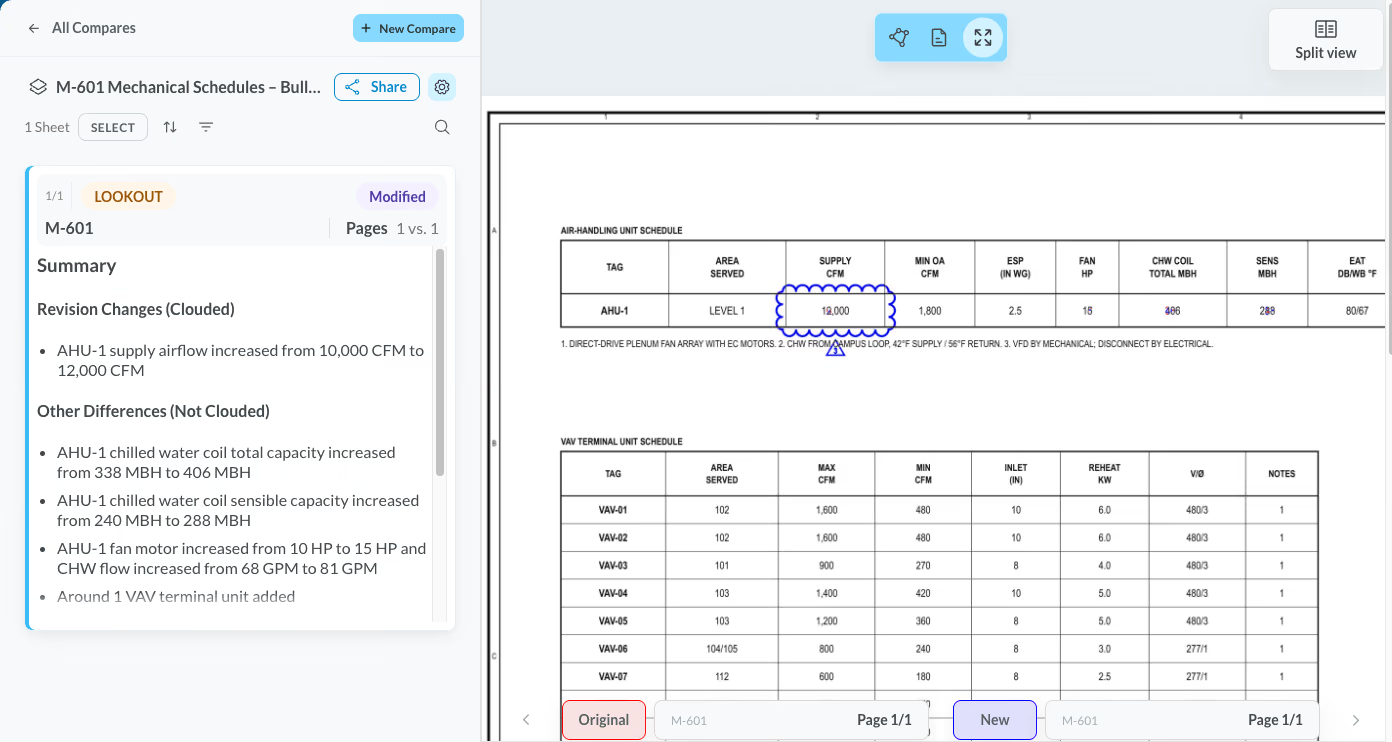
Pelles Compare checks a revision, addendum or bulletin against the set you priced or built from. It matches every sheet, marks what was added, removed or moved, and tells you in plain English what changed in your scope. Seconds per set, not hours on the light table.
Pelles Compare at a glance
- What it is
- AI drawing comparison software for MEP and specialty subcontractors. Part of Pelles Core, with DoubleCheck, Reports and Agents.
- What it compares
- Two sets of full-size drawing PDFs: a revision, addendum or bulletin against the set before it. No CAD files or special exports.
- What it catches
- Every added, removed and moved element, clouded or not.
- When the set changed shape
- Sheets are matched and aligned even when the titleblock, scale or sheet order changed between issues.
- What you get back
- Each change marked on the sheet, in overlay or side by side, and a summary per sheet of what changed and which trade it touches.
- Who runs it
- Estimators checking addenda before bid day. Project managers and engineers checking revisions and bulletins before they reach the field.
- Where the sets come from
- Drop in two sets, or link a Procore or Autodesk Construction Cloud project and new drawings come in as they are issued.
CompareRevisions
Watch it check a bulletin. Every sheet, every change.
Compare pairs every sheet in the new set with its last revision, lines them up and marks what changed, then tells you which changes touch your scope. Here it checks sheet M-201 against Bulletin 03.
Secondsto match and mark a revised set, work that took hours by hand
 CompareAsk anything about this project, or describe a taskHalcyon Campus · Building 2Job 24-118
← All compares+ New compare
IFC set vs Bulletin 03
18 sheets matched · 0 modified
3/18M-201Mech-elec coordinationComparing…
4/18E-601Panel schedules…
7/18P-101Plumbing plan, L1…
- Sheets matched for youEvery sheet in the new set paired with its last revision.
- Every change markedRemoved in red, added in blue, including the ones nobody clouded.
- A summary per sheetWhat changed, in words, and which trade it touches.
- Overlay or side by sideCheck any change before you price it or send an RFI.
Pelles Compare vs a Bluebeam overlay. Most teams use both.
Bluebeam Revu is where most subcontractors mark up and measure drawings, and its Overlay and Compare Documents tools show where two pages differ. Compare does the part that comes after: finding what changed across the whole set and what it means for your scope.
Checking one sheet you already know changed? An overlay is enough. A full revised set just landed? Start with Compare.
Bluebeam and Revu are trademarks of Bluebeam, Inc.
Run it every time a set changes. Before bid day and after award.
Before bid day: addenda
An addendum lands two days before bid. Compare it with the base set the day it is issued, price from the summary, and send pre-bid RFIs for what is still unclear. DoubleCheck answers what the specs now require, with the page cited, and an agent can watch the bid documents for new addenda overnight.
During the job: revisions and bulletins
A bulletin or revised set comes in from the GC. Compare it with the set you built from before anyone installs to the old drawings, and turn what changed into an RFI or a change order notice with Reports.
Built for the people who check the work.
SOC 2 Type II attestedNever trained on your contentAES-256 at restTLS 1.2+ in transitTenant isolation
- Every answer cites its page.Open the sheet or section behind any answer, report line or change.
- Your permissions, inherited.People see the projects and documents they can already open, nothing more.
- Your team stays in charge.Agents draft the RFI, the change event or the update for your team to review, and use only the systems you give them.
What estimators and PMs ask about comparing drawings.
Is there software that finds every change between two sets of construction drawings?
Yes. Pelles Compare takes two sets, such as a revision, addendum or bulletin and the set before it. It pairs every sheet in the new set with its last version, lines them up, and marks every added, removed and moved element, whether or not anyone clouded it. For each sheet it writes what changed and which trade it touches.
What’s a good alternative to Bluebeam for comparing drawing revisions?
If you compare full sets often, Pelles Compare. Bluebeam Revu’s Overlay and Compare Documents show where two pages differ: you pick the pages, align them, and work out what each difference means. Pelles Compare pairs the sheets across the whole set, aligns them for you and summarizes the changes by scope. Most teams keep Bluebeam for markups and takeoff, and Pelles connects to it: it brings in Studio files and their markups, and pushes marked-up PDFs back to Studio when you click.
Bluebeam overlay or an AI drawing comparison tool: which is better for MEP contractors?
For a full revised set, an AI comparison tool saves the most time. An overlay shows every difference on the page, including redrawn text and titleblock dates, and leaves the reading to you. Pelles Compare lines the sheets up and tells you which changes touch your trade, so the estimator or project manager starts with those. For a quick look at one sheet you already know changed, an overlay is enough.
How do subcontractors keep track of what changed in an addendum before bid day?
Compare each addendum with the base set the day it is issued, not the night before bid. In Pelles, Compare marks what the addendum changed on the drawings, DoubleCheck answers what the specs now require with the page cited, and an agent can watch the bid documents for new addenda overnight. Price from the summary and send pre-bid RFIs for anything the addendum leaves unclear.
Does it catch changes that were never clouded?
Yes. Pelles compares the drawings themselves, element by element, so it flags every added, removed and moved item whether or not anyone marked it. You no longer depend on the revision clouds being complete.
Won’t it flag a thousand trivial changes?
No. Pelles groups changes by what they touch in your scope and puts the ones that move cost, schedule or coordination first. You review a summary, not every pixel that moved.
What files does it work with?
Full-size drawing PDFs, revision over revision, plus addenda and bulletins. No CAD files or special exports. Drop in two sets, or link a Procore or Autodesk Construction Cloud project and its drawings come in and stay in sync.
Is our drawing data secure?
Yes. Pelles is SOC 2 Type II attested, encrypts data at rest (AES-256) and in transit (TLS 1.2+), isolates each customer’s data, and does not train models on your drawings. The details are on the security page and in the Pelles AI Trust Center.
Is Pelles Compare sold on its own?
Compare is part of Pelles Core, with DoubleCheck, Reports and Agents. Pelles is priced by team or company with unlimited usage, not per page or per token. You can start with a paid pilot on your own revisions; if you go ahead, the pilot fee credits toward the rollout.

Bring a revision that bit you. See what Compare catches.
In 20 minutes we’ll run Compare on one of your recent revisions or addenda and show you every change it marks, clouded or not.
- SOC 2 Type II attested
- A 20-minute call
- Your revisions or ours
Last updated