What Makes a Construction AI Agent Actually Work? Inside the Skills That Power It
 Matan Weksler12 min
A project manager opens a 600-page specification set for a new hospital wing. Within minutes, an AI agent has parsed every division, extracted 247 submittal requirements with spec citations, cross-referenced the drawings for conflicts, and flagged three sections where the mechanical and electrical scopes overlap ambiguously.
The PM didn't type 247 prompts. The agent fired off a series of skills — modular functions purpose-built for construction workflows — and orchestrated them into a finished deliverable.
But what exactly are these skills? How are they built? And what separates a well-designed skill from one that produces unreliable output your team can't trust?
This article answers those questions. If you've read our guide on AI agents for construction contractors, you understand what agents are and why they matter. Now we're going one level deeper: into the building blocks that make agents actually useful.
What Are Skills (And Why Should You Care)?
An AI agent without skills is like a general contractor who shows up to the jobsite with no subcontractors, no tools, and no trade expertise. They might understand the blueprints and talk intelligently about the project, but they can't frame a wall, pull wire, or set ductwork.
Skills are the atomic unit of agent capability. Each skill is a self-contained function that does one thing well: extract submittal requirements, generate an RFI, compare two document revisions, or check code compliance against a specific standard. The agent's job is to figure out which skills to call, in what order, and how to combine their outputs into something useful.
The analogy to construction is direct:
- The agent is the general contractor — it plans, coordinates, and manages the workflow
- Skills are the individual trades — each one specialized, each one called when their expertise is needed
- The project documents are the materials each trade works with
Without skills, an agent is just a language model that can talk about construction. It can summarize a paragraph you paste in, or answer a general question about HVAC sizing. But it can't autonomously process a full spec set, because it has no structured way to break that work into repeatable, reliable operations.
This is why the shift from tools to workers matters so much. Tools respond to individual commands. Workers — agents with skills — take on objectives and execute them. The skills are what make that execution possible.
The quality of an agent's skills determines the quality of its work, just as the quality of your subs determines the quality of your build. And just as context engineering shapes how well an agent understands your project, skill design shapes how well it acts on that understanding.
Examples of Construction Skills
To make this concrete, here are skills that a construction AI agent might have in its toolkit:
- Submittal extraction — scan spec sections and produce a structured log of every submittal requirement with citations
- RFI generation — identify conflicts between documents and draft an RFI with references and proposed resolutions
- Addendum comparison — diff two document versions and summarize every material change with page references
- Code compliance check — compare a design detail against a specific building code and flag non-conformance
- Scope extraction — identify trade-relevant sections from a bid package and summarize scope requirements
Each of these is a discrete, repeatable operation. That's the key property of a well-designed skill.
Anatomy of a Skill
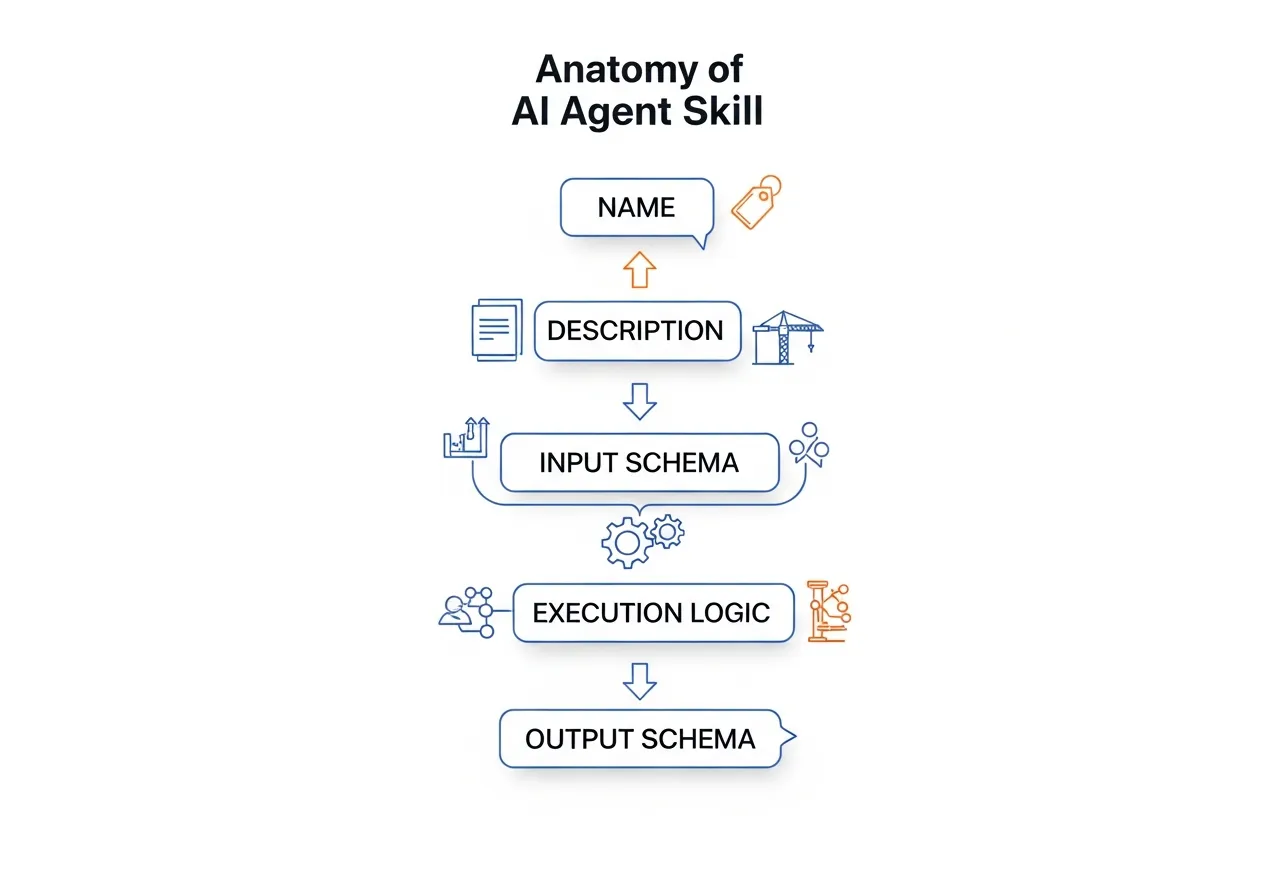
Every skill, regardless of what it does, shares the same five-part structure. Understanding this anatomy helps you evaluate any AI tool's capabilities — and ask better questions of vendors.
| Component | What It Does | Construction Parallel |
|---|---|---|
| Name | Identifies the skill so the agent can select it | Trade name on the bid list |
| Description | Explains what the skill does, when to use it, and when not to | Scope of work in the subcontract |
| Input Schema | Defines exactly what data the skill needs to operate | Spec requirements and drawing references handed to the sub |
| Execution Logic | The processing steps the skill performs | The actual trade work — measuring, cutting, installing |
| Output Schema | Defines the structure of what the skill returns | The deliverable — installed work, inspection report, as-built |
Beyond these five components, well-designed skills follow a principle called progressive disclosure. The agent doesn't load every skill's full instructions into memory at once — that would be like a GC reading every subcontract cover to cover before the first site meeting. Instead, skills load in layers: the agent first scans names and descriptions (like scanning trade names on a bid list), then loads full instructions only for the skills it actually needs (like pulling the relevant subcontract when that trade is called to the jobsite). This keeps the agent fast and focused, even when it has dozens of skills available.
Two components deserve extra attention.
The description is the most underrated piece. When an agent decides which skill to call, it reads the description. A vague description leads to the wrong skill being selected — just as a vague scope of work leads to trade disputes. Great descriptions include what the skill does, what types of input it handles best, and explicitly when it should not be used.
These "negative triggers" are just as important as the positive ones. A submittal extraction skill should state that it does not handle submittal log formatting or cover sheet generation — the same way a well-written subcontract defines exclusions alongside inclusions. Without clear boundaries, the agent will call the wrong skill for the wrong job, and you'll get unreliable output.
The schemas act like specification requirements — and they enable composability. The input schema ensures the skill receives properly formatted data — you wouldn't start a takeoff without confirmed drawings at the correct revision. The output schema guarantees that downstream processes (other skills, reports, human reviewers) receive data in a predictable structure.
When one skill's output matches another skill's expected input, they're composable — they can be chained together into workflows without manual reformatting in between. Composability is a core design principle of any serious agent platform, just as trade coordination is a core principle of any serious build. This is where standards like Model Context Protocol (MCP) come in: they provide a standardized way for skills to declare their interfaces, making it possible for agents built by different vendors to use each other's skills.
Worked Example: Building a Submittal Extraction Skill
Let's walk through building a real skill from scratch. We'll use submittal extraction — one of the most common and highest-value operations in preconstruction — as our example.
Step 1: Define the Purpose
Every skill starts with a clear statement of the problem it solves:
Purpose: Given a section of construction specifications, identify and extract every submittal requirement, producing a structured list with spec references, submittal types, and any associated conditions or deadlines.
This is a narrowly scoped problem. The skill doesn't generate the full submittal log (that's a workflow composed of multiple skill calls). It doesn't decide which spec sections are relevant to your trade (that's a different skill). It processes one section and extracts what it finds.
Keeping the scope tight is a deliberate design choice. A skill that tries to do everything — parse specs, filter by trade, build the log, and generate cover sheets — would be fragile, hard to test, and difficult to improve. The same principle applies to subcontracting: you hire an electrician for electrical work, not electrical-plus-plumbing-plus-drywall.
Step 2: Design the Inputs
The input schema defines exactly what data the skill needs. For submittal extraction:
{
  "spec_section_text": "The full text content of a single specification section",
  "division_number": "The CSI division number (e.g., '23' for HVAC)",
  "project_id": "Unique project identifier for cross-referencing"
}
Each field is intentional:
- spec_section_text — the raw content the skill will analyze. It expects a single section, not an entire spec book, because processing one section at a time is more reliable and easier to validate.
- division_number — provides context so the skill can apply division-specific extraction rules. Division 23 (HVAC) has different submittal patterns than Division 26 (Electrical).
- project_id — allows the skill to reference project-specific data like previously extracted requirements or vendor preferences.
Step 3: Design the Output
The output schema defines the structure of what the skill returns:
{
  "section_number": "01 33 00",
  "section_title": "Submittal Procedures",
  "requirements": [
    {
      "submittal_id": "01 33 00-001",
      "description": "Product data for each type of filing system",
      "type": "Product Data",
      "spec_reference": "Section 01 33 00, Paragraph 2.1.A",
      "conditions": "Submit within 30 days of Notice to Proceed",
      "priority": "Standard"
    }
  ],
  "confidence_score": 0.92,
  "warnings": [
    "Paragraph 3.2 references an appendix not included in the provided text"
  ]
}
Two fields deserve attention:
- confidence_score — the skill rates its own confidence in the extraction. A score of 0.92 means the section was well-structured and the requirements were clearly stated. A score of 0.6 might indicate OCR artifacts, unusual formatting, or ambiguous language. This gives downstream processes (and human reviewers) a signal about where to focus attention.
- warnings — the skill explicitly flags issues it encountered. A missing appendix reference, a cross-reference to another section, or unclear language gets surfaced rather than silently ignored. This is critical for construction workflows where completeness matters.
Step 4: Implement the Logic
The execution logic is the sequence of steps the skill performs. Here's the workflow in pseudocode:
1. VALIDATE inputs
   - Confirm spec_section_text is not empty
   - Confirm division_number matches a known CSI division

2. LOCATE submittal-related content
   - Search for keywords: "submit," "submittal," "furnish," "provide," "product data," "shop drawings," "samples"
   - Identify paragraph boundaries and hierarchy

3. EXTRACT each requirement
   - For each identified submittal reference:
     - Parse the description
     - Classify the type (Product Data, Shop Drawings, Samples, etc.)
     - Capture the exact spec paragraph reference
     - Identify conditions (timing, quantities, format requirements)
     - Assign a priority based on language ("prior to," "before proceeding")

4. CHECK cross-references
   - Flag any references to other spec sections or appendices
   - Note references to specific standards (ASTM, UL, NFPA)

5. CALCULATE confidence score
   - Based on text quality, extraction completeness, and ambiguity count

6. RETURN structured output matching the output schema
This is where the skill moves from definition to action. Notice that the logic doesn't try to interpret ambiguity — it flags it. It doesn't guess at missing information — it warns about it. Reliable skills report what they find and what they can't find, leaving judgment calls to the agent or the human reviewer.
Step 5: Handle Errors
Real-world spec documents are messy. A robust skill anticipates common problems:
- Missing sections — the text doesn't contain any submittal-related content. The skill returns an empty requirements array with a warning, not an error. An empty result is valid information: this section has no submittal requirements.
- OCR artifacts — scanned specifications often contain garbled text. The skill lowers its confidence score and flags paragraphs where extraction was uncertain.
- Non-standard formatting — some specs use unusual numbering, embed requirements in notes, or reference submittals indirectly. The skill attempts extraction but marks these as lower-confidence hits.
- Oversized sections — a section that exceeds the skill's processing capacity gets split and processed in chunks, with a warning about potential cross-reference issues at chunk boundaries.
Error handling is what separates a demo from a production tool. Your team needs to trust the output, and trust comes from transparency about limitations. This is exactly how the submittal extraction behind Pelles Agents works under the hood — every requirement comes with a confidence score and explicit warnings, so your PM knows exactly where to focus review time instead of re-reading the entire spec set.
For more on how well-designed submittal management software handles these challenges in practice, see our comparison guide.
How the Agent Uses a Skill
A skill by itself is a function. It takes an input, processes it, and returns an output. The agent is what turns individual skill calls into a complete workflow.
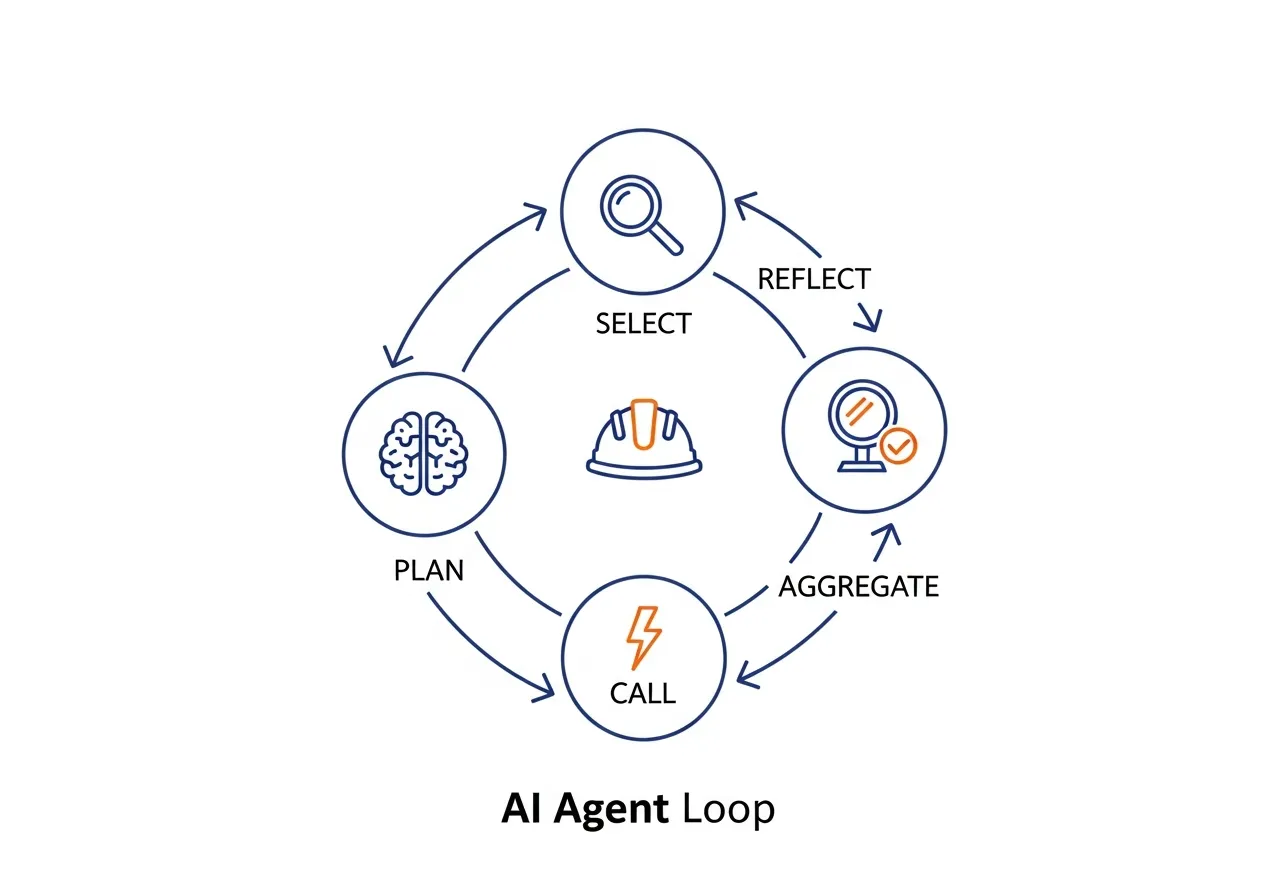
Here's how an agent might use the submittal extraction skill as part of a larger task:
1. Plan. The agent receives a goal: "Extract all submittal requirements from this specification set for Division 26." It breaks this into steps: identify relevant sections, extract requirements from each, aggregate results, and review for completeness.
2. Select. For each step, the agent reads the available skill descriptions and selects the right one. The submittal extraction skill's description matches the extraction step.
3. Call repeatedly. The spec set contains 14 sections relevant to Division 26. The agent calls the submittal extraction skill 14 times, once per section, passing the appropriate text and division number each time.
4. Aggregate. The agent collects all 14 skill outputs — a total of 83 submittal requirements — and merges them into a unified log. It deduplicates entries that appear in multiple sections and resolves cross-references.
5. Reflect and refine. The agent reviews the aggregated output. Three skill calls returned confidence scores below 0.7 — the agent flags these for human review. Critically, the reflect step can loop back: the agent might re-call the extraction skill on low-confidence sections or cross-reference ambiguous results against the drawings, mirroring the submittal review cycle of submit, review, revise, resubmit.
Inside the agent's reasoning:
"I've been asked to extract Division 26 submittals. I have 14 relevant spec sections. I'll call extract_submittals for each one. Section 26 05 00 returned 12 requirements with 0.94 confidence — looks clean. Section 26 24 16 returned 3 requirements with 0.61 confidence and a warning about OCR artifacts in paragraphs 2.3 through 2.5. I'll include these results but flag them for PM review. Aggregated total: 83 requirements. Two potential duplicates between sections 26 05 00 and 26 27 26 — I'll merge them and note both source references."
This plan-select-call-aggregate-reflect loop is the core pattern of agentic AI in construction. The skills do the work; the agent provides the judgment. And as we've explored in Beyond the Prompt, this pattern enables AI to move from reactive tool to proactive teammate — running submittal extraction automatically when new specs arrive, not just when someone remembers to ask.
Three Mistakes That Break Construction AI Skills
You've seen what a well-built skill looks like. Here's how they go wrong — and how to spot these problems when evaluating AI tools.
Mistake 1: The "Kitchen Sink" Skill
A vendor shows you a single skill that reads specs, filters by trade, extracts submittals, generates the log, creates cover sheets, and emails the GC. Impressive demo. Fragile in production.
When one piece fails — say, the cover sheet formatting breaks on a non-standard spec — the entire skill fails. There's no way to rerun just the extraction, no way to swap in a better log generator, no way to debug which step went wrong. It's the equivalent of hiring one sub to do mechanical, electrical, and plumbing: when the HVAC install falls behind, your electrical rough-in is stuck too.
What to look for: Ask the vendor to describe individual skills, not end-to-end workflows. If they can't decompose their system into discrete, testable units, the architecture is brittle.
Mistake 2: The Vague Description Problem
The skill is called process_document. Its description says "processes construction documents." That's it.
This is the equivalent of a scope of work that says "do the electrical stuff." The agent has no way to distinguish this skill from any other document-related function. It'll call the wrong skill for the wrong task, or call this one when it should call something more specific. Result: unpredictable output that your team stops trusting.
What to look for: Ask what the skill's description includes. Does it specify input types, document formats, and — critically — when it should not be used? A good skill description reads like a tight scope of work, not a vague capability statement.
Mistake 3: Skills That Can't Chain Together
Skill A extracts submittals as a free-text summary. Skill B generates a submittal log but expects structured JSON with specific fields. They don't connect.
This is the digital version of a framing crew that doesn't build to the dimensions the electrician needs for conduit runs. Each trade's output has to be the next trade's input. When skills produce inconsistent or unstructured output, the agent can't compose them into workflows — it has to stop and ask a human to reformat data between steps.
What to look for: Ask whether skill outputs feed directly into other skills. Ask to see the output schema. If results are free-text blobs instead of structured data with consistent fields, the system can't scale beyond one-off tasks.
How Good Skills Get Tested
You wouldn't accept a sub's first day of work without inspecting it. The same principle applies to AI skills. A well-engineered skill goes through three layers of validation before it's trusted with production workflows:
Triggering tests verify that the skill fires on the right inputs — and stays silent on the wrong ones. Does the submittal extraction skill activate when the agent receives a spec section? Good. Does it also activate when someone asks a general question about project timelines? That's a problem. Triggering accuracy is the first quality gate.
Functional tests confirm that the skill produces correct, complete output. Given a known spec section with 8 submittal requirements, does the skill find all 8? Does it classify them correctly? Does it generate valid spec references? This is the equivalent of a punch list inspection — checking every item against the expected result.
Performance benchmarks measure whether the skill actually improves on the baseline. How many back-and-forth corrections does a human need to make? How does the output compare to what a PM would produce manually? If a skill doesn't measurably outperform the manual process, it's not ready for production — no matter how impressive the demo looked.
When evaluating AI tools, ask vendors about their testing process. A vendor who can describe specific test cases and quality metrics has built something reliable. A vendor who says "we tested it and it works" has built a demo.
What This Means for Construction
Skills are what turn a generic language model into a construction AI agent. Without them, you have a system that can discuss construction intelligently but can't do construction work. With well-designed skills, you have an agent that can process specs, extract requirements, compare documents, flag conflicts, and produce deliverables your team can actually use.
For construction teams evaluating AI tools, understanding skills gives you a framework for asking better questions:
- "What are the inputs to your submittal extraction?" — tells you whether the tool processes raw documents or requires pre-formatted data
- "What does the output structure look like?" — reveals whether results are structured and auditable or just free-text summaries
- "How does it handle edge cases?" — distinguishes production-ready tools from demos that work only on clean, well-formatted specs
- "Can skills be composed into workflows?" — shows whether the tool can grow with your needs or is limited to isolated functions
- "What are the success metrics for each skill?" — reveals whether the vendor measures quality rigorously or just ships features and hopes for the best
The construction industry is moving toward AI agents that work as persistent, ambient teammates — always monitoring, always processing, always ready. Skills are the mechanism that makes this possible. Each skill is a unit of capability that the agent can deploy autonomously, and the better those skills are designed, the more your team can trust the results.
And skills aren't static — they're living systems that improve over time. Every edge case encountered, every low-confidence extraction flagged, every workflow that required human correction feeds back into better skill design. The best construction AI platforms treat skills the way the best GCs treat sub relationships: they invest in them continuously, track performance over time, and refine based on real project data rather than assumptions.
The companies that will lead in construction AI aren't just the ones with the most sophisticated models. They're the ones building the most reliable, well-scoped, transparent skills — the digital equivalent of a bench of trusted, specialized subcontractors who show up, do quality work, and tell you when something's not right.
Ready to see how purpose-built AI skills handle your project documents? Book a demo with Pelles and see the difference between a chatbot and an agent that actually does the work.
Frequently asked questions
What is a skill in the context of construction AI agents?
A skill is a modular, self-contained function that an AI agent can call to perform a specific task. It defines what inputs it needs, what logic it runs, and what structured output it returns. In construction, examples include extracting submittal requirements from specifications, generating RFIs from document conflicts, or comparing addenda across revisions.
Do I need to write code to build an AI agent skill?
Not necessarily. Many agent platforms allow you to define skills through configuration — specifying inputs, outputs, and logic rules — without writing traditional code. However, understanding the structure of a skill (its input schema, execution logic, and output schema) helps you evaluate vendor tools and design better workflows, even if the platform handles the implementation.
What is the difference between a skill and a prompt?
A prompt is a single instruction sent to a language model. A skill is a complete, reusable function with defined inputs, structured outputs, validation, and error handling. Prompts are part of a skill's execution logic, but a skill adds the structure, reliability, and composability that production workflows require. Think of a prompt as a verbal instruction to a tradesperson, while a skill is the full scope of work with specifications, acceptance criteria, and quality checks.
How do you test whether an AI agent skill actually works?
Well-engineered skills go through three layers of testing. Triggering tests confirm the skill activates on the right inputs and stays silent on unrelated ones. Functional tests verify that outputs are correct and complete — like a punch list inspection against expected results. Performance benchmarks measure whether the skill outperforms the manual process in speed, accuracy, and consistency. When evaluating vendors, ask them to describe their testing process and specific quality metrics.