Best AI Document Management System (2026 Guide)
 Pelles.aiUpdated 11 min
An AI document management system (AI-DMS) is a DMS that uses LLMs to read, classify, and search construction documents without manual tagging. Unlike a traditional DMS, it requires no taxonomy setup, improves with usage, and can generate deliverables like RFIs and submittal drafts from your existing files.
Key takeaways
- AI document management for construction reads drawings, specs, addenda, RFIs, and submittals and turns them into structured outputs — without forcing teams to tag or migrate files.
- Best fit by use case: Pelles (intelligence layer for MEP subcontractors), Newforma + Autodesk Construction Cloud (version control), Laserfiche + LogicalDOC (governance and records), Procore and PlanGrid (field access).
- What construction-specific AI does that horizontal tools can't: understands cross-references between drawings, specs, and addenda; tracks how a spec change cascades into submittal requirements.
- Layering vs. replacing: the strongest pattern is an AI intelligence layer on top of existing storage (SharePoint, Google Drive, Procore) — no migration project required.
Here is the shortlist at a glance. Each tool is covered in detail below, grouped by the use case it fits best.
| # | Tool | Use case | Best for | Pricing |
|---|---|---|---|---|
| 1 | Pelles | Intelligence layer for MEP subcontractors | High-volume estimating and precon teams | Custom quote |
| 2 | Newforma Project Center | Spec and drawing version control | Rigorous transmittal tracking and document lineage | By inquiry |
| 3 | Autodesk Construction Cloud | Spec and drawing version control | Teams standardizing on Autodesk | By inquiry |
| 4 | Egnyte | External sharing and transmittals | Strict external controls for vendor and owner distribution | By inquiry |
| 5 | Asite | External sharing and transmittals | Formal transmittals with recipient tracking | By inquiry |
| 6 | Bluebeam | Field markup and sheet management | Subcontractors that live in PDFs | Revu / Bluebeam Cloud subscriptions |
| 7 | Procore | Field markup and sheet management | Teams standardizing on Procore | By inquiry |
| 8 | LogicalDOC | Governance and records | On-prem or hybrid DMS with configurable retention | By inquiry |
| 9 | Laserfiche | Governance and records | Public agencies and compliance-heavy enterprises | By inquiry |
| 10 | DocuWare | Governance and records | Mid-market cloud records retention | By inquiry |
Construction documents are messy. Hundreds of spec sheets and addenda frequently drop late. Generic file shares just can’t keep up with the versioning or audit trail owners demand.
In addition to this chaos, the pipeline is heating up. The Dodge Momentum Index shows planning activity is up ~51% year over year, meaning more work is entering precon and more documents to control.
That’s why the right document management software (DMS) matters. Teams that modernize their DMS benefit from higher win rates, faster turnarounds, and fewer misses. Let’s explore the top document management software per use case.
What Is Document Management Software?
Document management software (DMS) stores, organizes, secures, and tracks project and business documents throughout their lifecycle, from initial addendum to final closeout.
In construction, that means drawings, specs, RFIs, submittals, schedules, photos, contracts, and emails live in a single controlled source of truth rather than scattered across inboxes.
This guide focuses on the AI layer and ranks tools by the job you need done. For a category-by-category look at storage, workflow, and collaboration platforms, see our roundup of the best construction document management software.
Different teams lean on document management software at different points in the project:
- Estimators and preconstruction use it early to wrangle documents, such as addenda.
- Project managers and operations rely on it during execution for version control, transmittals, approvals, and field access.
- Executives and compliance teams need a DMS for tasks like audit trails and risk management.
Core capabilities typically include:
- Version control for drawings and specs
- Structured transmittals and approval workflows
- Large-file sync with offline access
- Role-based permissions
- Metadata and advanced search
- Integration hooks to the rest of your tech stack
10 Best Document Management Software by Use Case
Use Case: Intelligence Layer for MEP Subcontractors
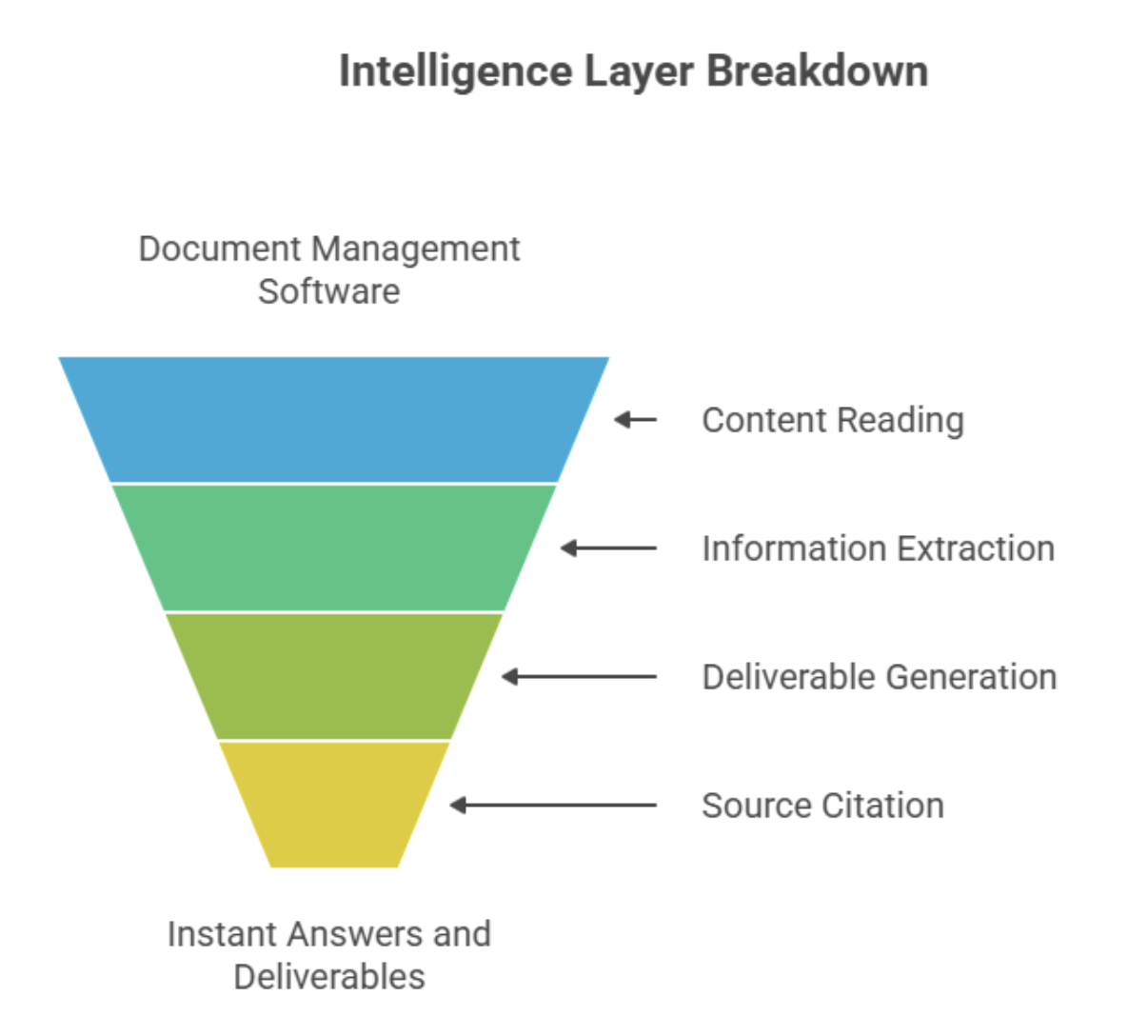
An intelligence layer sits on top of your existing document management software and actually reads the drawings, specs, addenda, and submittals you already store. Then, it turns the content into whatever you need: RFIs, proposal language, submittal drafts, and scope checklists with source citations. Basically, instead of flipping through 300+ pages to hunt for requirements, teams get instant answers and auto-generated deliverables they can trust.
Benefits of Intelligence Layers
- Cut spec review time: Go from days to minutes on multi-hundred-page sets.
- Catch changes early: Spot contradictions and scope shifts the day the addenda drop.
- Consistent deliverables: Standardized RFIs, proposals, and submittals, ensuring the same quality across estimators and projects.
See how one electrical contractor cut spec review time by 70–80% →
3 Key Features of Intelligence Layers
- Clause-level citations back to contract documents, so every line is traceable.
- Change summaries by CSI or discipline with page and sheet references for fast assignment.
- Organizational Wiki that turns past RFIs, proposals, vendor notes, and lessons learned into searchable knowledge.
1. Pelles
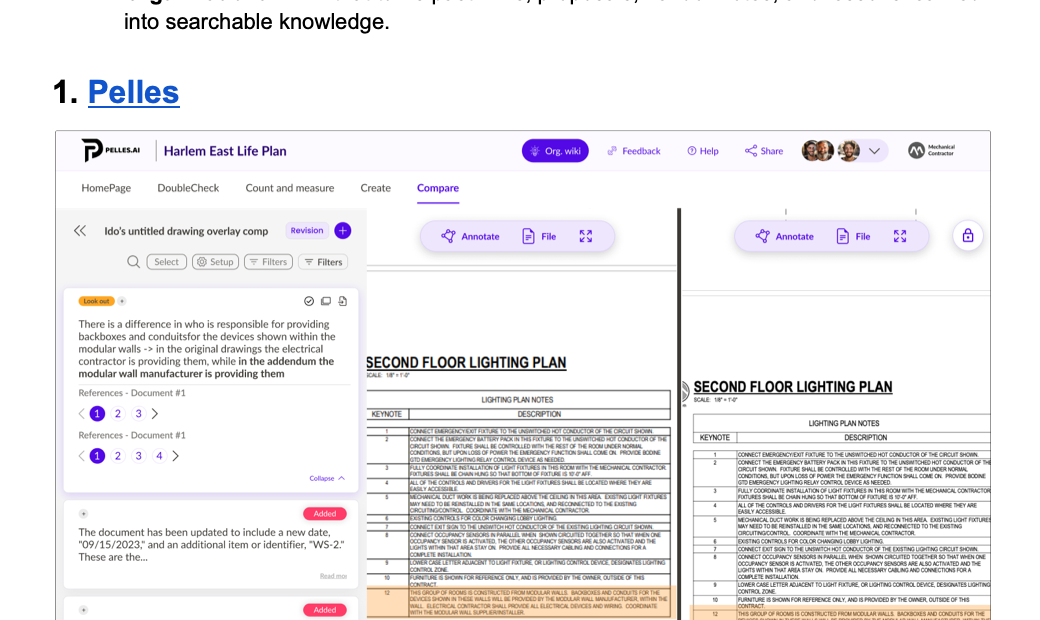
Pelles is an AI-driven layer that ingests construction documents at scale. Instead of wading through PDFs, teams get the critical requirements, changes, and next steps surfaced automatically. It sits above your existing DMS and project management tools, turning static files into actionable scope clarity and ready-to-send deliverables.
Pelles’ key capabilities include:
- DoubleCheck: Surface every requirement tied to your scope from the full document set with clause-level citations.
- Compare: Catch contradictions and changes across drawings, specs, and addenda with clear, trustworthy diffs.
- Generative AI Workflows: Auto-draft RFIs and submittal registers in your templates and voice.
- Organizational Wiki: Turn past projects, vendor cut sheets, codes, and labor rates into a searchable knowledge base.
Best for: High-volume estimating and precon teams who need faster reviews and higher win rates without adding headcount.
Pricing: Speak with the Pelles team for a customized quote.
Use Case: Spec and Drawing Version Control
When addenda land back-to-back, version confusion is a real risk. You need clarity over sheets and specs, plus fast, reliable compares so estimators, PMs, and the field are always working from the current set. An intelligence layer can also support this use case by calling out scope deltas and tying changes back to source pages for traceability.
Benefits of DMS for Spec and Drawing Version Control
- Fewer misses on scope deltas: Reduce surprises from late addenda and spec clarifications.
- Faster reviews across disciplines: Electrical, mechanical, and plumbing teams align on changes in minutes.
- Cleaner handoffs to field teams: The latest sheets and marked-up changes flow downstream with confidence.
3 Key Features of DMS for Spec and Drawing Version Control
- Sheet and spec versioning with revision histories: Clear lineage from Issued for Bid to final, with who, when, and what changed.
- Compare and overlay tools with change callouts: Catch changes, such as conductor upsizing or added voltage drop test criteria, on the day addenda drop.
- Transmittals with traceability: Send the right set, confirm receipt, and maintain a defensible audit trail.
2. Newforma Project Center
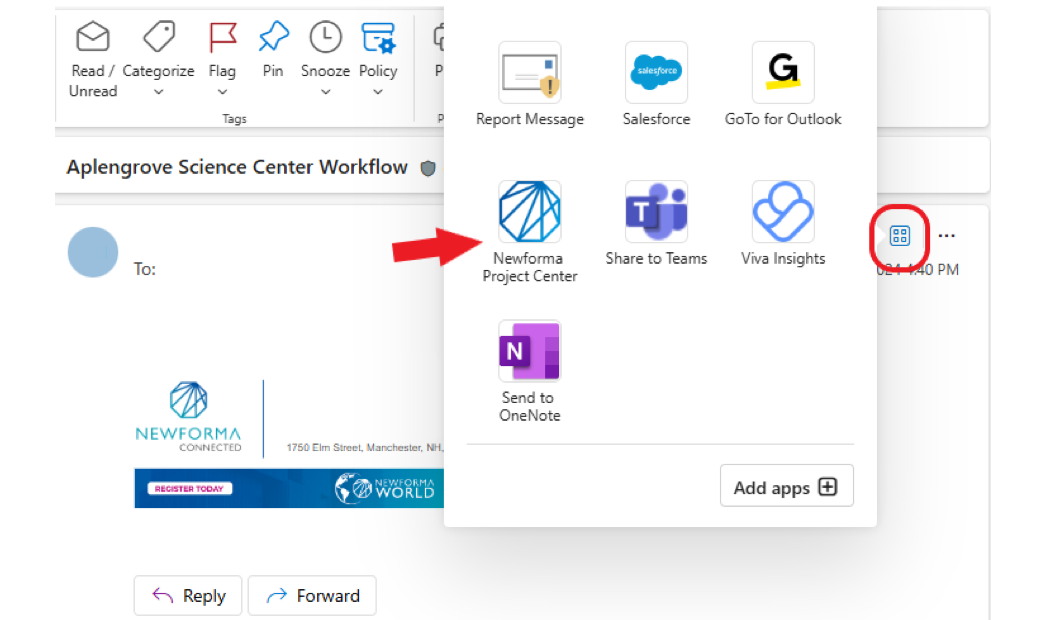
Purpose-built for AEC document control, Newforma helps teams manage transmittals and compare revisions so everyone works from the current set. Its Document Control and Transmittals centers provide traceability from Issued for Bidding to Issued for Construction with clear revision metadata and receipt logs.
Best for: Design-centric and general contractor or construction manager teams needing rigorous transmittal tracking and document lineage on complex projects.
Pricing: By inquiry.
3. Autodesk Construction Cloud
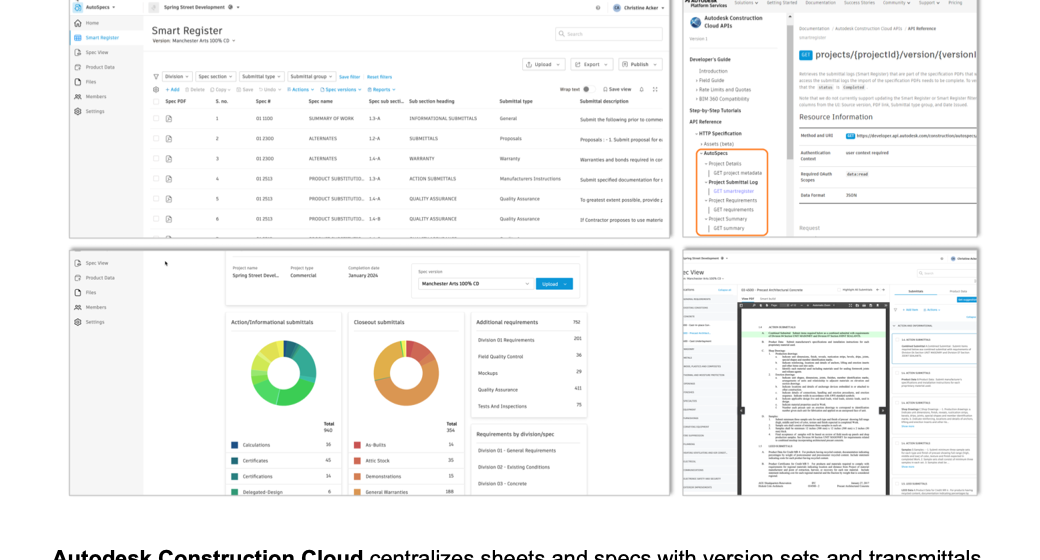
Autodesk Construction Cloud centralizes sheets and specs with version sets and transmittals, so reviewers can spot deltas and confirm distribution quickly. Recent updates also expand specification management to segment long spec books for easier navigation.
Best for: Teams standardizing on Autodesk Construction Cloud who want built-in version control tied to field and project management workflows.
Pricing: By inquiry.
Use Case: External Sharing and Transmittals with Traceability
Vendor packages and owner deliverables don’t just need to be sent; they need to be controlled. Secure distribution and audit trails ensure the right parties see the right files at the right time, with proof of receipt and version history. That means fewer email chains and cleaner closeouts.
Benefits of DMS for External Sharing and Transmittals
- Controlled external access: Share only what’s needed, to who needs it, with time-boxed permissions.
- Reduced email sprawl: Centralized links replace oversized attachments and scattered threads.
- Clear proof of who saw what, when: Defensible logs for submittals, addenda, and owner shares.
3 Key Features of DMS for External Sharing and Transmittals
- Secure links with expiration and watermarking: Time-limited access and file-level watermarks to deter forwarding.
- Transmittal logs and acknowledgments: Track sends, opens, downloads, and confirmations for audit-ready records.
- Role-based permissions: Granular controls for vendors, design partners, owners, and field crews.
4. Egnyte
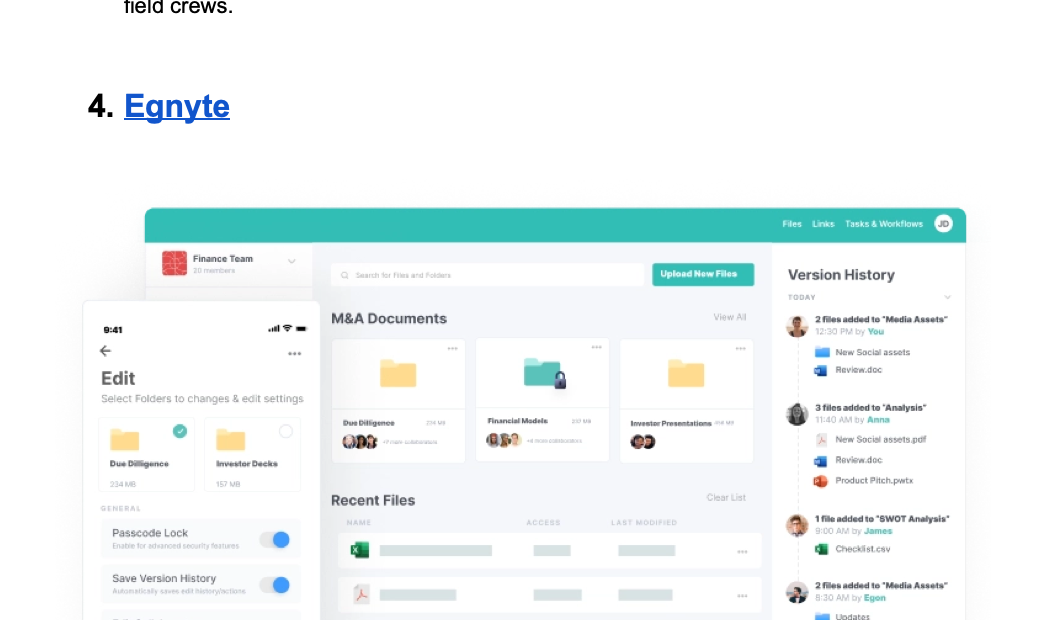
Egnyte gives AEC teams secure, controlled external sharing with granular permissions and full auditability. Architecture, engineering, and construction-specific tooling helps manage large files and coordinate with vendors and owners while keeping a defensible trail of who accessed what and when.
Best for: Contractors that need strict external controls and AEC-focused workflows for vendor and owner distribution.
Pricing: By inquiry.
5. Asite
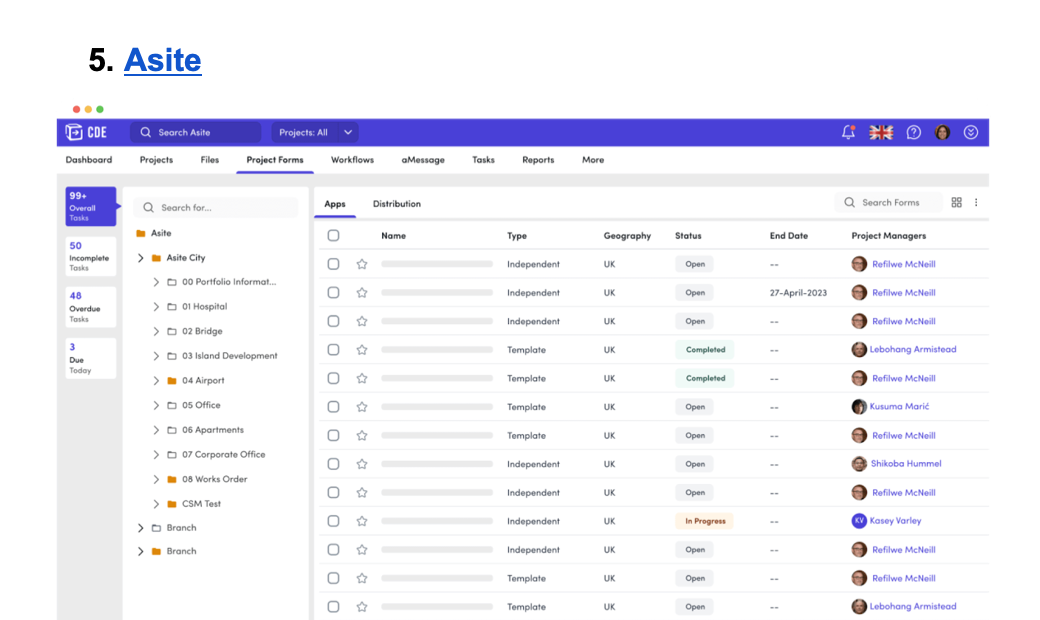
Asite’s common data environment is built for controlled distribution. Teams use it to issue transmittals and maintain an auditable record of every share, down to version, distribution list, and status, while managing permissions at the folder and file level.
Best for: Owners and subcontractors standardizing on a common data environment who need formal transmittals with recipient tracking and granular access controls.
Pricing: By inquiry.
Use Case: Field Markup and Sheet Management
Field crews need instant access to the latest sheets without having to guess or deal with stale PDFs. When connectivity is spotty, they also need an offline sync that actually works. Document management software helps you assign issues and push feedback back to the office for a clean record of what changed.
Benefits of DMS for Field Markup and Sheet Management
- Fewer field errors: Crews always build from the current set with clear callouts.
- Faster punchlist and closeout: Issues are captured on the sheet and resolved faster.
- Better feedback loop: Redlines and comments flow from field to office without email churn.
3 Key Features of DMS for Field Markup and Sheet Management
- Mobile and offline sync for large plan sets: Cache full projects to devices; changes are reconciled when online.
- Markup and issue tracking on sheets: Photos and checklists tied to specific sheet locations.
- Simple publishing of updated sets: Push new revisions in clicks and notify the right crews.
6. Bluebeam
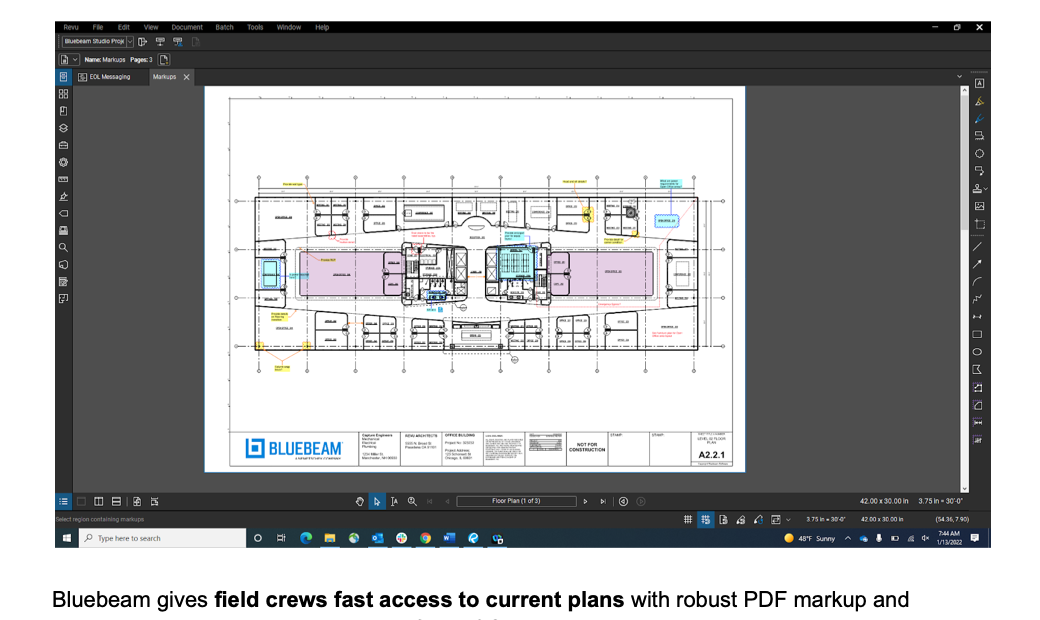
Bluebeam gives field crews fast access to current plans with robust PDF markup and real-time reviews. Teams can redline from iOS, Android, or web, and sync changes back to the office when they’re online.
Best for: Subcontractors that live in PDFs and need reliable mobile markups and offline-friendly tracking.
Pricing: Bluebeam is sold as Revu/Bluebeam Cloud subscriptions.
7. Procore
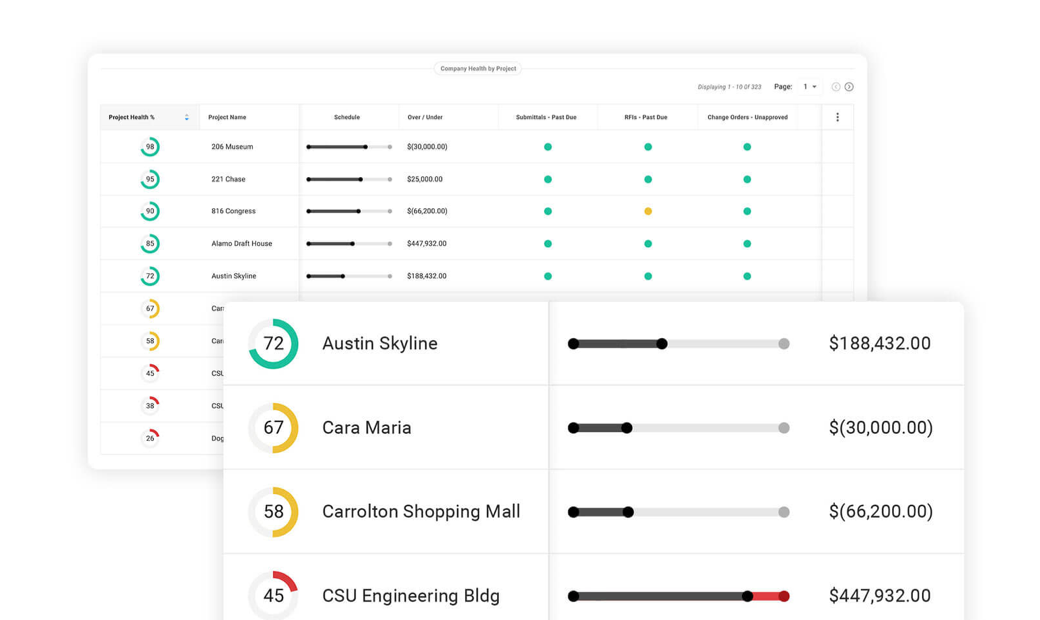
Procore centralizes “current set” drawings and lets crews mark up sheets on mobile. Markups can be published for team visibility, and mobile apps support offline capture and editing of punch items, which is useful when the signal is unreliable on site.
Best for: Teams standardizing on Procore who want markups and drawing distribution tied into their broader project controls.
Pricing: By inquiry via subscriptions.
Use Case: Governance and Records
When audits, public records requests, or litigation holds are in play, governance can’t be an afterthought. You need built-in controls that preserve the record and prove who accessed what without adding extra work for your team.
Benefits of DMS for Governance and Records
- Compliance by default: Policies apply automatically to the right folders and projects.
- Faster audits and responses: Find and export records with clear lineage and metadata.
- Lower administrative overhead: Reduce manual filing and ad-hoc tracking with automated retention and defensible logs.
3 Key Features of DMS for Governance and Records
- Records management with policy-based retention: Set schedules by document class with automated cutoff, review, and disposition.
- Legal hold and e-discovery: Place custodians and documents on hold, suspend disposition, and export review-ready sets.
- Pin install notes and QC photos to sheet locations: Feed punch items back to planning or manufacturing solutions to correct future runs.
8. LogicalDOC
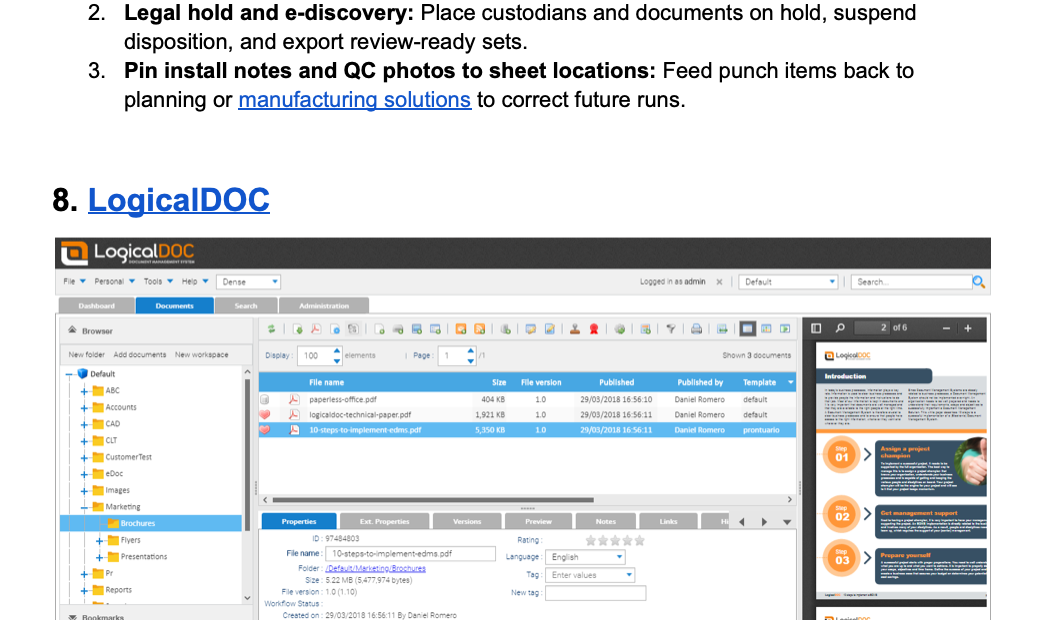
LogicalDOC provides policy-driven records management with a detailed audit history, so you can prove the chain of custody and disposition decisions. Teams use it to configure retention schedules and enforce access controls to meet compliance needs.
Best for: Organizations that need on-prem or hybrid DMS with configurable retention and auditable histories.
Pricing: By inquiry.
9. Laserfiche
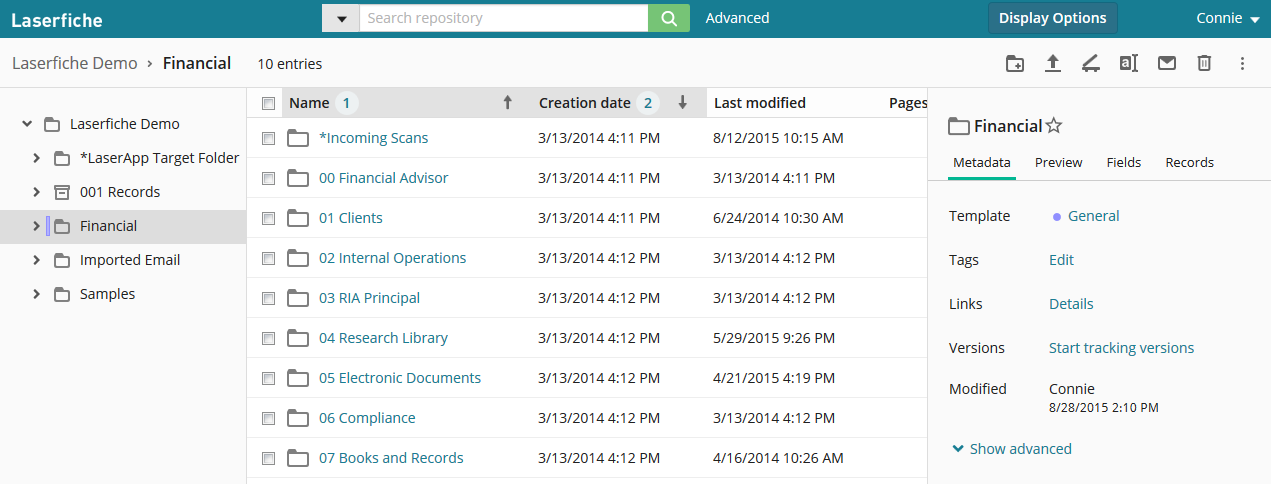
Laserfiche bakes in information governance, including eDiscovery and legal holds, so you can preserve records, suspend disposition, and export with full audit trails during audits or litigation.
Best for: Public agencies and compliance-heavy enterprises that require legal holds and audit-ready exports.
Pricing: By inquiry.
10. DocuWare
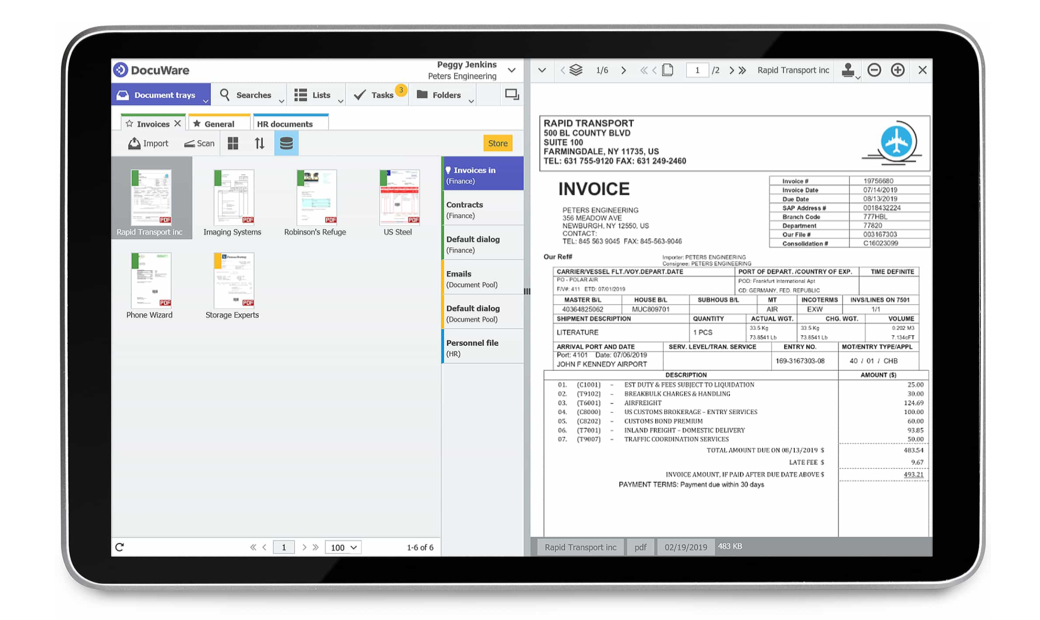
DocuWare focuses on automated retention and secure archiving to make compliance “by default.” Policies can trigger timed retention and deletion, while audit trails document every access and change for reviewers.
Best for: Mid-market teams that need cloud-friendly records retention and clear auditability without heavy eDiscovery tooling.
Pricing: By inquiry.
The Document Management Software You Trust and the Intelligence You Need
Document overload and version chaos are accelerating. The fix is about choosing the right document management software for your use case, whether that’s version control for addenda-heavy projects or baked-in governance when audits or legal holds are on the table. Then, add in an intelligence layer like Pelles.
Pelles snaps onto your DMS and does the heavy lifting, pulling scope requirements straight from specs and drawings and auto-building proposal language and submittal drafts in your templates. A built-in wiki turns past project docs, vendor cut sheets, codes, and labor rates into instant answers. The result is that you can bid more and protect margin without hiring.
Ready to see how Pelles works with your projects? Book a call, and we’ll walk your team through a focused pilot.
Frequently asked questions
What is document management software in construction?
Construction document management software stores, organizes, secures, and tracks drawings, specs, addenda, RFIs, submittals, schedules, contracts, and related records in one controlled source of truth. Core capabilities include version control, structured transmittals and approvals, large-file sync with offline access, role-based permissions, metadata search, and integrations with the rest of the project stack.
How should teams choose document management software?
Start with the primary job you need done: an intelligence layer that reads documents, version control for specs and drawings, controlled external sharing, field markups, or governance and records. Then evaluate integrations with the tools you already run, traceability of every change and share, and how well the workflow fits the way estimators, PMs, and field crews actually work.
Why add an intelligence layer on top of a DMS?
Storage keeps files organized, but nobody reads them for you. An intelligence layer reads the drawings, specs, addenda, and submittals already in your DMS and turns them into practical outputs: RFIs, proposal language, submittal drafts, and scope checklists, each with citations back to the source page. Teams cut multi-day spec reviews to minutes and catch changes the day addenda drop.
What is the best AI document management software in 2026?
The best AI document management software in 2026 depends on your use case. For MEP subcontractors who need an intelligence layer that reads specs and generates deliverables, Pelles is purpose-built. For version control, Newforma and Autodesk Construction Cloud lead. For governance and records, Laserfiche and LogicalDOC are top choices.
What is AI document management for construction?
AI document management for construction is software that reads drawings, specs, addenda, RFIs, and submittals and produces structured outputs without manual tagging — like a list of submittal requirements pulled from a 600-page spec, or a draft RFI generated from a flagged contradiction. It differs from horizontal AI document tools because it understands construction-specific document types and how they reference each other.
What is the best AI document platform for trade contractors?
Trade contractors should evaluate AI document platforms on three things: whether the platform reads construction document types natively (drawings, specs, submittal logs, RFIs), whether it cites the exact page and paragraph in its outputs, and whether it sits on top of your existing file storage rather than forcing a migration. Pelles is built for MEP and trade contractor workflows; horizontal AI tools cover broader categories but miss construction-specific context.
How is AI document management different for construction vs. other industries?
Construction documents are uniquely cross-referenced: a single spec note can affect multiple drawings, submittal requirements live across hundreds of pages, and addenda silently change earlier requirements. Generic AI document tools treat each file as a standalone unit. Construction AI document management understands these cross-references, tracks revisions across linked files, and surfaces the impact of changes — which a horizontal tool can't do because it lacks the schema for drawings, specs, and addenda.
Can small construction teams use AI document management?
Yes. Modern AI document platforms are subscription-based and layer on top of existing storage like SharePoint, Google Drive, or Procore — no migration or IT project required. Small teams typically see the highest ROI because they don't have dedicated document control staff, so automated requirement extraction and submittal log generation directly absorbs work they'd otherwise skip or do late.