The project is 95% complete. The GC sends an email: "O&M manuals due in 10 days."
Now you're scrambling. Chasing manufacturer literature. Tracking down warranty certificates. Trying to remember what equipment got installed where.
This scramble is preventable.
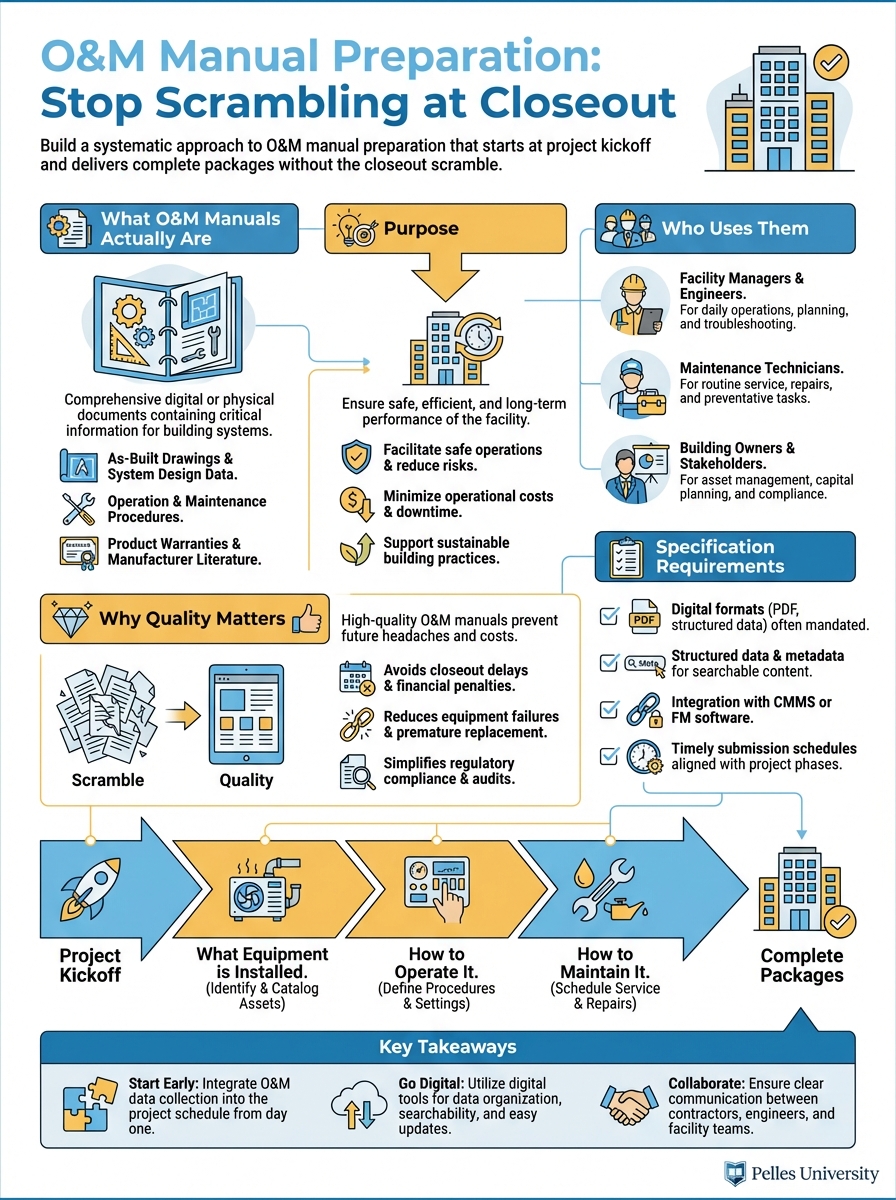
What O&M Manuals Actually Are
Purpose
Operations and Maintenance (O&M) manuals tell the building owner:
- What equipment is installed
- How to operate it
- How to maintain it
- How to troubleshoot problems
- Who to call for service
They're the instruction manual for the building systems you installed.
Who Uses Them
Facility managers: Daily operations and maintenance scheduling
Maintenance technicians: Troubleshooting and repairs
Building engineers: System optimization
Future contractors: Understanding existing systems
Your O&M manual may be referenced for the next 30 years.
Why Quality Matters
Poor O&M manuals:
- Generate calls to you for information
- Cause maintenance mistakes
- Create liability exposure
- Damage your reputation
Quality O&M manuals:
- Enable proper maintenance
- Reduce post-completion support burden
- Demonstrate professionalism
- Build owner confidence
Specification Requirements
Finding the Requirements
O&M requirements typically appear in:
Division 01 (General Requirements):
- Section 01 78 23: Operation and Maintenance Data
- Section 01 78 36: Warranties
- Section 01 79 00: Demonstration and Training
Technical sections:
- Each equipment specification section may have additional requirements
Read both Division 01 and your technical sections carefully.
Common Requirements
Format:
- Binder type and size
- Tab organization
- Digital format requirements
- Number of copies
Content:
- Product data for all equipment
- Maintenance procedures
- Parts lists and sources
- Wiring and control diagrams
- Warranty information
Timing:
- Draft submission for review
- Final submission deadline
- Training completion
Sample Requirement Language
From a typical specification:
"Assemble O&M data into durable binders with identification on front cover and spine. Organize by specification section. Include equipment-specific information including nameplate data, installed location, and as-built settings."
The phrase "equipment-specific" is key—generic literature isn't enough.
Building the System
Start at Kickoff
During submittal processing:
- Create O&M folder structure matching spec sections
- As submittals are approved, file O&M-relevant content
- Note what's missing from each submittal
- Request missing information from vendors
Don't wait for closeout to start collecting.
Track Progress
Create an O&M tracking log:
| Spec Section | Equipment | Submittal | O&M Status | Missing Items |
|---|---|---|---|---|
| 23 05 00 | Hangers/Supports | Approved | Partial | Seismic certification |
| 23 31 13 | Ductwork | Approved | Complete | - |
| 23 34 00 | HVAC Fans | Approved | Partial | Wiring diagrams |
| 23 73 00 | Air Handling Units | Approved | Partial | Control sequences |
Review monthly. Chase missing items early.
File Organization
Physical binders:
Volume 1 - Mechanical
  Tab 1: Section 23 05 00 - Common Work
  Tab 2: Section 23 21 00 - Hydronic Piping
  Tab 3: Section 23 31 00 - HVAC Ducts
  Tab 4: Section 23 34 00 - HVAC Fans
  Tab 5: Section 23 73 00 - Air Handling Units
  ...
Digital folders:
O&M Manuals/
  01-Mechanical/
    23-05-00_Common-Work/
    23-21-00_Hydronic-Piping/
    23-31-00_HVAC-Ducts/
    ...
  02-Electrical/
    26-05-00_Common-Work/
    26-24-00_Switchboards/
    ...
Mirror the spec organization exactly.
Content Requirements
For Each Piece of Equipment
Basic information:
- Equipment tag/designation
- Manufacturer and model
- Serial number
- Location in building
- Specification section reference
Technical documentation:
- Product data sheet
- Installation instructions
- Operation instructions
- Maintenance requirements
- Troubleshooting guide
- Parts list
Project-specific:
- Nameplate data (actual ratings)
- As-built settings and setpoints
- Control sequences
- Wiring diagrams (as-installed)
Equipment-Specific Sheets
Create a cover sheet for each major piece of equipment:
EQUIPMENT DATA SHEET

Equipment Tag: AHU-1
Description: Air Handling Unit
Manufacturer: Carrier
Model: 39M10
Serial Number: 1234567890
Location: Mechanical Room 101
Specification Section: 23 73 00

Design Conditions:
  Airflow: 5,000 CFM
  Cooling Capacity: 15 tons
  Motor HP: 7.5

As-Built Settings:
  Supply Air Temp Setpoint: 55°F
  Static Pressure Setpoint: 1.5" WC
  Economizer Changeover: 55°F OAT

Local Representative:
  Company: ABC Mechanical Supply
  Contact: John Smith
  Phone: (555) 123-4567
This makes the generic manufacturer literature specific to your installation.
Maintenance Schedules
Compile maintenance requirements into a usable format:
| Equipment | Daily | Weekly | Monthly | Quarterly | Annual |
|---|---|---|---|---|---|
| AHU-1 | Check filters | Check belts | Lube bearings | Inspect coils | Full PM |
| Pumps | Check operation | Check seals | Check alignment | Rebuild | |
| VAV Boxes | Check operation | Calibrate |
Owners appreciate consolidated maintenance information.
Warranty Summary
Create a warranty summary page:
| Equipment | Warranty Period | Start Date | Expiration | Contact |
|---|---|---|---|---|
| AHU-1 | 1 year parts | 03/15/25 | 03/15/26 | Carrier (800) 555-1234 |
| AHU-1 Compressor | 5 year | 03/15/25 | 03/15/30 | Carrier (800) 555-1234 |
| Controls | 2 year | 03/15/25 | 03/15/27 | Trane (800) 555-5678 |
Include warranty certificates behind the summary.
Common Problems
Problem: Generic Literature Only
Symptom: O&M consists of manufacturer brochures with no project-specific information
Solution: Create equipment data sheets with installed information. Add nameplate data, settings, and locations to generic documentation.
Problem: Missing Documentation
Symptom: Submittals were approved but O&M content wasn't included
Solution: Start tracking at submittal approval. Request missing content immediately, not at closeout.
Problem: Disorganized Content
Symptom: Information exists but can't be found
Solution: Use consistent organization matching spec sections. Create tables of contents. Use clear labeling.
Problem: Outdated Information
Symptom: O&M doesn't reflect as-built conditions
Solution: Update O&M content when changes occur. Incorporate as-built information from field.
Problem: Last-Minute Scramble
Symptom: Two weeks before closeout, nothing is assembled
Solution: Monthly O&M status reviews. Progressive assembly throughout project.
Working with Vendors
Setting Expectations
At purchase order:
- Specify O&M requirements
- Reference specification sections
- Include format requirements
- Set delivery timeline
Example PO language:
"Provide O&M documentation per specification Section 01 78 23 including product data, maintenance procedures, parts lists, and wiring diagrams. Submit with equipment delivery."
Following Up
If vendor O&M is incomplete:
- Document what's missing specifically
- Reference PO and spec requirements
- Set deadline for completion
- Escalate to manufacturer if needed
Make this a procurement issue, not a closeout issue.
Control Contractors
Controls documentation requires special attention:
- Points lists with descriptions
- Sequence of operations
- Graphic screenshots
- Trending setup
- Alarm configurations
- Network architecture
Get commitments for this documentation in the controls contract.
Digital Delivery
PDF Requirements
Most projects now require digital O&M:
Organization:
- Bookmarked PDF files
- Consistent file naming
- Hyperlinked table of contents
- Searchable text (OCR if needed)
File naming convention:
[Section#]_[Description]_[Equipment].pdf
Example: 23-73-00_AHU_ProductData.pdf
Building Management System Integration
Some owners want O&M linked to their BMS or CMMS:
- Equipment asset numbers
- Standardized naming
- Maintenance procedure codes
- Spare parts integration
Ask about these requirements early.
Cloud Delivery
Requirements may include:
- Specific platform (Procore, Box, etc.)
- Folder structure
- Access permissions
- Retention requirements
Understand the delivery method before assembly.
Quality Review
Self-Check Before Submission
Review each section for:
Completeness:
- All specified equipment covered
- All required documents included
- Equipment-specific data added
- Warranties included
Accuracy:
- Model numbers match installed
- Settings match as-built
- Locations are correct
- Contacts are current
Format:
- Organization matches requirements
- Tabs and dividers correct
- Cover and spine identified
- Page numbers if required
Draft Submission
Submit draft O&M for review before final:
Benefits:
- Identify missing content
- Clarify format expectations
- Avoid rejection at closeout
- Time to obtain missing items
Request draft review 60-90 days before closeout.
Using AI for O&M Preparation
Creating Equipment Sheets
Create an equipment data sheet template for an air handling unit
that includes:

- Basic identification (tag, manufacturer, model, serial, location)
- Design conditions (CFM, capacity, motor HP)
- As-built settings section
- Local representative contact section
- Reference to O&M binder location

Format for printing on one page.
Compiling Maintenance Schedules
Based on this manufacturer maintenance literature, create a
consolidated maintenance schedule table:

[Paste manufacturer maintenance requirements]

Format as:
- Equipment type
- Daily tasks
- Weekly tasks
- Monthly tasks
- Quarterly tasks
- Annual tasks
Checking Completeness
Review this O&M table of contents against the specification
sections listed below. Identify any missing items:

Table of Contents:
[Paste your TOC]

Required Specification Sections:
[Paste spec section list]

Note any gaps or potential missing content.
Timeline
Project Start (Month 1)
- Review spec requirements for O&M
- Create folder structure
- Set up tracking log
- Communicate requirements to vendors
During Construction
- File O&M content as submittals are approved
- Track missing items
- Follow up with vendors
- Collect as-built information
90 Days Before Closeout
- Complete review of tracking log
- Submit draft for review
- Chase all missing items
- Begin assembly
30 Days Before Closeout
- Incorporate review comments
- Complete equipment data sheets
- Compile warranties
- Final assembly and QC
At Closeout
- Submit final O&M
- Deliver training materials
- Obtain acceptance
What's Next
Complete O&M manuals are one part of closeout. They work alongside as-built drawings, warranty documentation, and training to give the owner everything they need to operate and maintain your installed systems.
TL;DR
- Start O&M collection at project kickoff, not at closeout
- Create equipment-specific cover sheets—generic literature isn't enough
- Organize by specification section to match project manual structure
- Track progress monthly and chase missing items early
- Submit draft for review 60-90 days before closeout
- Include warranties, maintenance schedules, and contact information