You need to find something in the project documents. Do you use AI or just search the PDF?
The answer depends on what you're looking for.
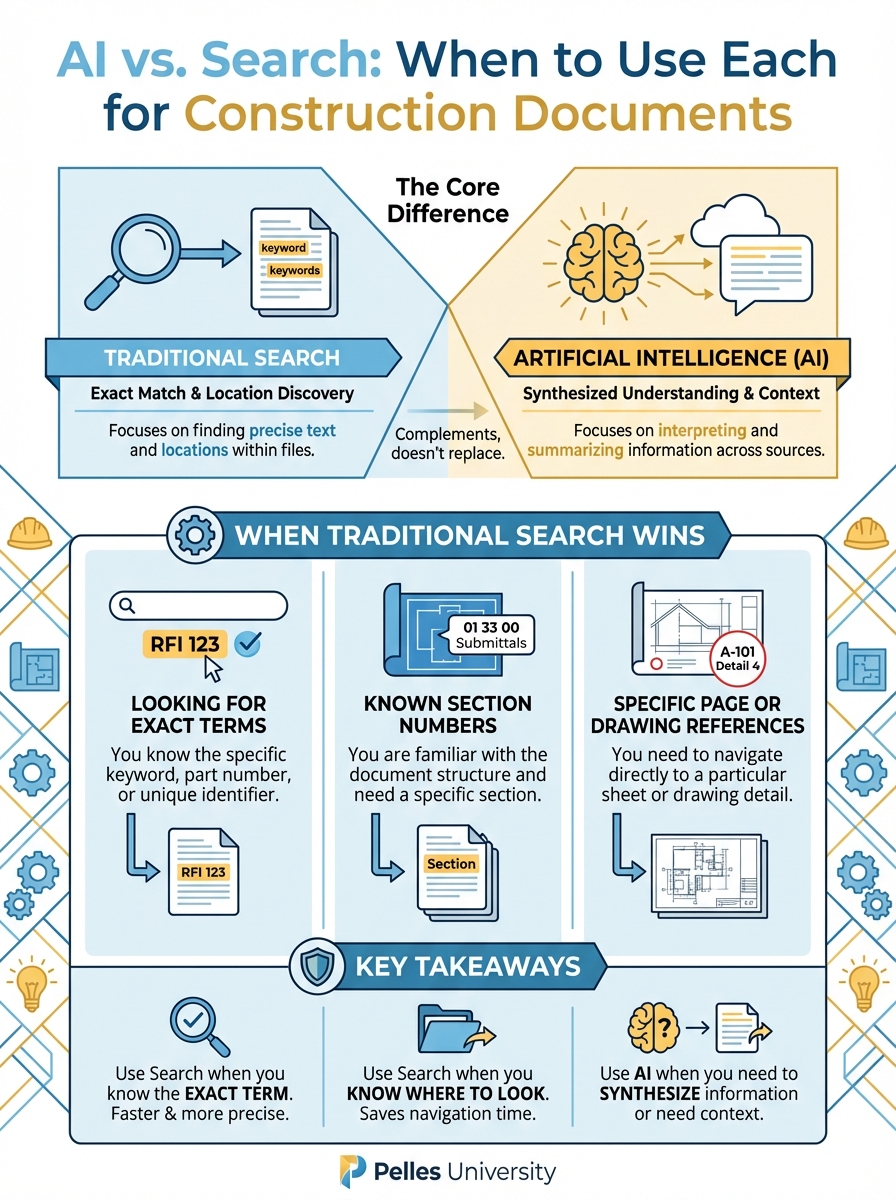
The Core Difference
Traditional search finds exact text matches.
AI understands meaning and context.
Both have their place. Knowing when to use each saves time and improves accuracy.
When Traditional Search Wins
Looking for Exact Terms
If you know exactly what you're looking for, search is faster.
Example: Find every mention of "VAV box"
Search: Ctrl+F → "VAV box" → Done in seconds AI: Slower, might miss exact matches, might include related terms you didn't want
Winner: Search
Known Section Numbers
If you know the spec section, go directly there.
Example: Find Section 23 73 00 testing requirements
Search: Ctrl+F → "23 73 00" → Navigate to section → Read Part 3 AI: Type prompt, wait for response, verify it found the right section
Winner: Search
Specific Page or Drawing References
Finding a specific location is a search task.
Example: Find Drawing M-301
Search: Open drawing set → Navigate to M-301 AI: Unnecessary overhead
Winner: Search
Verifying AI Output
Ironically, verifying AI requires search.
Example: AI says requirement is in Paragraph 3.2.4
Verification: Search for "3.2.4" → Read the actual text
Winner: Search (for verification)
When AI Wins
Questions That Span Multiple Sections
When information is scattered, AI shines.
Example: "What are ALL the testing requirements for this project?"
Search: Search "test" → Get hundreds of results → Read each one → Compile manually AI: Ask the question → Get compiled answer → Verify key items
Winner: AI
Conceptual Questions
When you're not sure what terms to search for.
Example: "What could affect our labor productivity on this project?"
Search: What do you even search for? "labor"? "productivity"? "conditions"? AI: Understands the concept → Identifies relevant sections → Explains implications
Winner: AI
Comparison Tasks
Comparing documents requires understanding, not just finding.
Example: "How does Addendum 3 change the duct insulation requirements?"
Search: Open both documents → Find insulation sections → Read both → Compare manually AI: Compares both versions → Identifies specific changes → Explains impact
Winner: AI
Summarization
Condensing information is an AI strength.
Example: "Summarize the key requirements in this 50-page spec section"
Search: Can't summarize AI: Reads entire section → Extracts key points → Provides summary
Winner: AI
Pattern Recognition Across Documents
Finding themes or patterns across multiple documents.
Example: "What coordination requirements exist between mechanical and electrical?"
Search: Would need to search both specs, multiple sections, various terms AI: Scans all relevant sections → Identifies coordination points → Compiles list
Winner: AI
Interpretation Questions
When you need explanation, not just location.
Example: "What does this indemnification clause mean for us?"
Search: Can find the clause, can't explain it AI: Finds clause → Explains in plain language → Identifies implications
Winner: AI
The Decision Framework
Use Search When:
- You know the exact term
- You know where to look
- You need to verify a specific fact
- Speed matters more than comprehensiveness
- The task is simple location, not understanding
Use AI When:
- You don't know the exact terms
- Information is scattered across documents
- You need synthesis, not just location
- You need explanation or interpretation
- The task involves comparison or summarization
Hybrid Approaches
Often the best approach combines both:
Pattern: AI First, Search to Verify
- Ask AI for overview
- AI provides answer with citations
- Search to verify citations
- Confirm accuracy
Example: "What commissioning requirements affect our scope?"
- AI lists requirements with section references
- Search each section to verify
- Confirm and use
Pattern: Search First, AI to Synthesize
- Search to find relevant sections
- Compile the sections
- AI to summarize or compare
Example: Finding all warranty requirements
- Search "warranty" to find all mentions
- Collect the relevant paragraphs
- AI to summarize into a single warranty matrix
Pattern: AI for Scope, Search for Detail
- AI to identify what exists
- Search to get exact language
Example: Understanding liquidated damages
- AI explains what LD clauses the contract contains
- Search to find exact clause and read full language
Common Mistakes
Mistake 1: Using AI for Simple Lookups
Don't use AI to find a specific section number. Just search.
Mistake 2: Using Search for Conceptual Questions
Don't try to find "risks" by searching for the word "risk." Use AI.
Mistake 3: Trusting AI Without Verification
AI finds and interprets, but search verifies. Always verify important items.
Mistake 4: Forgetting Search Exists
AI is exciting. Don't forget that Ctrl+F is still often the fastest tool.
Practical Examples
Finding Equipment Specs
Task: What are the specs for Chiller-1?
Approach: Search
- Search "Chiller-1" in equipment schedules
- Go directly to the result
Understanding Equipment Specs
Task: Does Chiller-1 have any unusual requirements compared to typical chillers?
Approach: AI
- AI reviews the spec
- Identifies non-standard requirements
- Explains what's unusual
Finding a Clause
Task: Where is the change order clause?
Approach: Search
- Search "change order" in the contract
- Navigate to results
Understanding a Clause
Task: How does this change order clause compare to standard AIA language?
Approach: AI
- AI reads the clause
- Compares to standard terms
- Identifies differences
Finding Requirements
Task: Find the insulation specification
Approach: Search
- Search "insulation" or spec section number
- Navigate to section
Compiling Requirements
Task: What are all the insulation requirements across mechanical and plumbing specs?
Approach: AI
- AI scans multiple sections
- Compiles comprehensive list
- Organizes by system
Building Good Habits
Default to Search for Location
If you're just trying to find where something is, search first.
Default to AI for Understanding
If you need to understand, compare, or synthesize, use AI.
Always Verify Important Items
Whether you used search or AI, verify critical information.
Track What Works
Note which approach works best for different task types in your work.
What's Next
Knowing when to use AI vs. search is tactical. The next step is thinking strategically about where AI fits in your overall workflow—from bid to closeout.
TL;DR
- Use search when you know exactly what you're looking for
- Use AI when you need understanding, comparison, or synthesis
- Search is faster for exact terms; AI is better for concepts
- Combine both: AI to find and synthesize, search to verify
- Don't use AI for simple lookups—Ctrl+F is still your friend